Why MongoDB
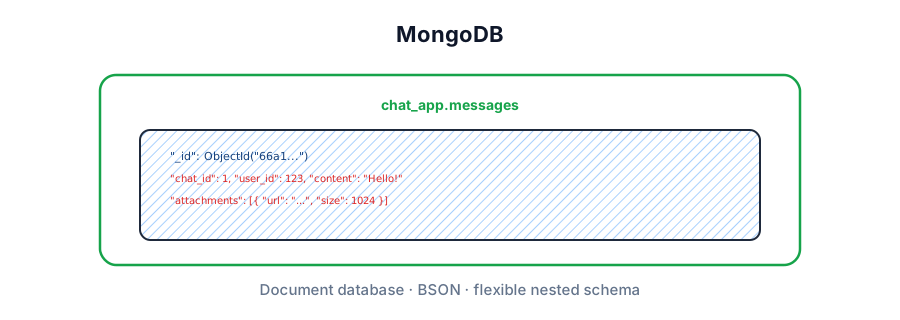
MongoDB is a document database. Buzzwords again — what do they mean?
- Document model — data lives as BSON documents (Binary JSON) you can nest and array freely. One round trip often loads a whole object graph.
- Flexible schema — documents in the same collection can have different fields. Validate in app code or with
$jsonSchema— Mongo won't enforce a rigid table schema by default. - Queryable NoSQL — filter, sort, project, and aggregate on any indexed field without pre-designing every access path as a GSI (unlike DynamoDB). Unindexed queries still become collection scans.
For system design interviews, MongoDB covers most persistence needs: secondary indexes, transactions, change streams (CDC), replica-set HA, and sharding for write scale. The moral: easy to start, powerful when you design documents around access patterns — and painful when you embed unbounded arrays.
DB · collection · document.
find · aggregate · indexes.
Replica set · sharding.
16 MB doc · embed wisely.

Hands-on lab
Run everything below locally in under five minutes. This is the DynamoDB-depth equivalent of "open the console and create a table" — except you own the process.

1. Start MongoDB with Docker
# Detached container, port 27017, named volume for data
docker run -d --name mongo-lab \
  -p 27017:27017 \
  -v mongo-lab-data:/data/db \
  mongo:7

# Shell into the container
docker exec -it mongo-lab mongosh
2. Seed a chat database (mongosh)
use chat_app

// Drop and recreate for a clean lab
db.users.drop()
db.messages.drop()

db.users.insertMany([
  {
    _id: ObjectId("64a000000000000000000101"),
    name: "Evan",
    email: "evan@example.com",
    age: 28,
    tags: ["admin", "beta"]
  },
  {
    _id: ObjectId("64a000000000000000000102"),
    name: "Stefan",
    email: "stefan@example.com",
    address: { city: "Seattle", zip: "98101" },
    tags: ["beta"]
  }
])

db.messages.insertMany([
  {
    chat_id: 1,
    user_id: ObjectId("64a000000000000000000101"),
    content: "Hello!",
    num_attach: 0,
    created_at: ISODate("2024-08-06T10:00:00Z")
  },
  {
    chat_id: 1,
    user_id: ObjectId("64a000000000000000000102"),
    content: "What time is it?",
    num_attach: 1,
    created_at: ISODate("2024-08-06T10:05:00Z")
  },
  {
    chat_id: 2,
    user_id: ObjectId("64a000000000000000000101"),
    content: "Hey team",
    num_attach: 0,
    created_at: ISODate("2024-08-06T11:00:00Z")
  }
])

db.users.find().pretty()
db.messages.find({ chat_id: 1 }).sort({ created_at: 1 })
3. Same operations from Node.js
// npm i mongodb
import { MongoClient, ObjectId } from "mongodb";

const uri = process.env.MONGO_URI ?? "mongodb://127.0.0.1:27017";
const client = new MongoClient(uri);

async function main() {
  await client.connect();
  const db = client.db("chat_app");
  const messages = db.collection("messages");

  // Create indexes once at boot / migration
  await messages.createIndex({ chat_id: 1, created_at: -1 });
  await db.collection("users").createIndex({ email: 1 }, { unique: true });

  // Query — page of a chat thread
  const page = await messages
    .find({ chat_id: 1 })
    .sort({ created_at: -1 })
    .limit(20)
    .project({ content: 1, user_id: 1, created_at: 1, _id: 0 })
    .toArray();

  // Atomic patch
  await messages.updateOne(
    { _id: new ObjectId("...") },
    { $set: { content: "Hello!!" }, $inc: { edit_count: 1 } }
  );

  console.log(page);
  await client.close();
}

main().catch(console.error);The data model
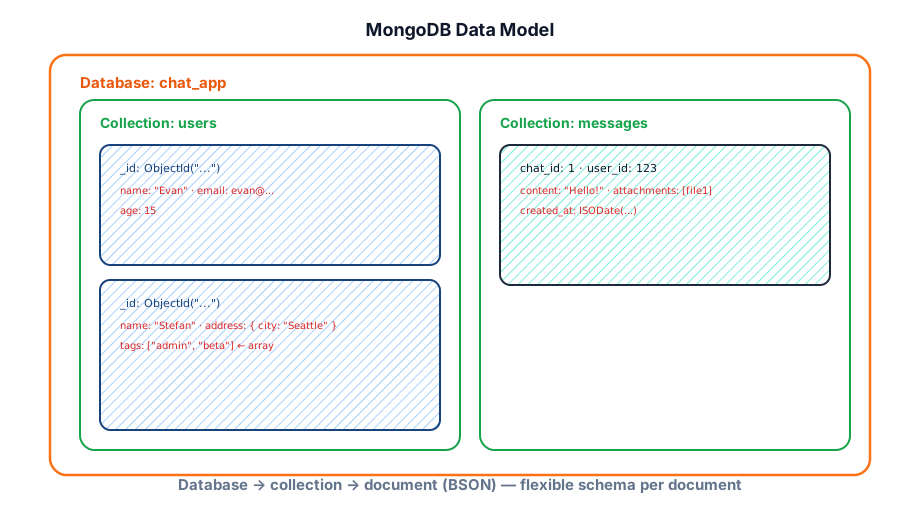
Hierarchy: Database → Collection → Document → Field. Collections are schema-flexible — documents in the same collection can have different fields.
- _id — unique primary key per document; auto-generated ObjectId if omitted (12-byte, roughly time-sortable).
- BSON types — String, Number (Int32/Int64/Double/Decimal128), Boolean, Date, ObjectId, Array, Embedded Document, BinData, Null.
- 16 MB limit — maximum document size; critical when embedding arrays — hard ceiling, not a soft guideline.
Optional schema validation
Production teams often add $jsonSchema validators so "flexible" doesn't mean "garbage in." Validation runs on insert/update — reject bad docs instead of discovering them in prod.
db.createCollection("users", {
  validator: {
    $jsonSchema: {
      bsonType: "object",
      required: ["email", "name"],
      properties: {
        email: { bsonType: "string", pattern: "^.+@.+\\..+quot; },
        name: { bsonType: "string", minLength: 1 },
        age: { bsonType: "int", minimum: 0 },
        tags: { bsonType: "array", items: { bsonType: "string" } }
      }
    }
  },
  validationAction: "error" // or "warn" while migrating
})
Under the hood, WiredTiger (default storage engine) stores documents in a document-oriented format with compression; secondary indexes are B-trees. You reason about documents and indexes — not pages and rows — but the same advice applies: hot working set should fit in RAM.
CRUD operations
MongoDB's driver API and mongosh use the same method names. Updates can replace the whole document or patch fields with operators — prefer operators so you don't clobber concurrent writers.
// Create
db.messages.insertOne({
  chat_id: 1,
  user_id: ObjectId("64a000000000000000000101"),
  content: "Hello!",
  created_at: new Date()
})

db.messages.insertMany([
  { chat_id: 1, user_id: ObjectId("64a000000000000000000102"), content: "What time is it?" },
  { chat_id: 2, user_id: ObjectId("64a000000000000000000101"), content: "Hey team" }
])

// Read
db.messages.find({ chat_id: 1 })
db.messages.findOne({ user_id: ObjectId("64a000000000000000000101") })

// Update — $set patches; never replace unless you mean it
db.messages.updateOne(
  { _id: ObjectId("...") },
  { $set: { content: "Hello!!" }, $inc: { edit_count: 1 } }
)

// Array operators
db.users.updateOne(
  { email: "evan@example.com" },
  { $addToSet: { tags: "mentor" }, $pull: { tags: "beta" } }
)

// Upsert — idempotent worker writes
db.sessions.updateOne(
  { session_id: "abc" },
  { $set: { last_seen: new Date() }, $setOnInsert: { created_at: new Date() } },
  { upsert: true }
)

// Delete
db.messages.deleteMany({ chat_id: 2 })Querying
Queries use a filter document plus optional projection, sort, skip, and limit. Operators cover comparisons, arrays, existence, and logical combinations.
// Comparison & logical
db.messages.find({
  chat_id: 1,
  created_at: { $gte: ISODate("2024-08-01") },
  content: { $regex: /^Hello/ }
})

// Array operators
db.users.find({ tags: { $in: ["admin"] } })
db.users.find({ tags: { $all: ["admin", "beta"] } })

// Nested fields — dot notation
db.users.find({ "address.city": "Seattle" })

// Projection — return only needed fields (saves bandwidth + deserialization)
db.messages.find(
  { chat_id: 1 },
  { projection: { content: 1, user_id: 1, _id: 0 } }
)

// Sort + offset pagination (OK for small offsets)
db.messages.find({ chat_id: 1 })
  .sort({ created_at: -1 })
  .limit(20)
  .skip(40)

// Keyset pagination (preferred at scale — no deep skip)
db.messages.find({
  chat_id: 1,
  created_at: { $lt: ISODate("2024-08-06T10:05:00Z") }
}).sort({ created_at: -1 }).limit(20)Indexes
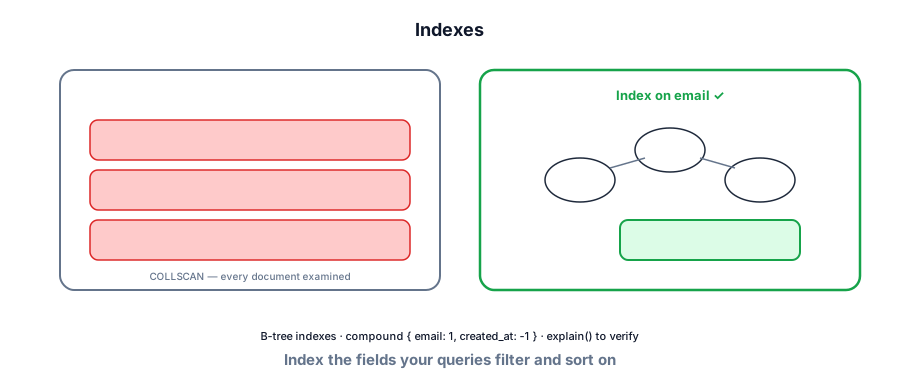
Indexes are B-trees (WiredTiger). Default unique index on _id. Create indexes on fields you filter, sort, or join on — see Database indexing.
// Single-field
db.users.createIndex({ email: 1 }, { unique: true })

// Compound — order matters for { chat_id, created_at } queries
db.messages.createIndex({ chat_id: 1, created_at: -1 })

// Multikey — automatic on array fields
db.users.createIndex({ tags: 1 })

// TTL — expire sessions after 24h
db.sessions.createIndex({ created_at: 1 }, { expireAfterSeconds: 86400 })

// Partial — index only active docs (smaller, cheaper)
db.orders.createIndex(
  { user_id: 1, created_at: -1 },
  { partialFilterExpression: { status: { $eq: "open" } } }
)

// Verify query plan
db.messages.find({ chat_id: 1 }).sort({ created_at: -1 }).explain("executionStats")
// Look for: stage: "IXSCAN" not "COLLSCAN"- Compound index prefix — index on { a, b, c } supports queries on a; a+b; a+b+c — not b alone.
- ESR rule — Equality fields, then Sort, then Range for compound index design.
- Text / geospatial — specialized indexes for full-text (
$text) and$nearqueries. - Covered queries — if projection fields ⊆ index keys, Mongo can answer from the index alone.
Schema design
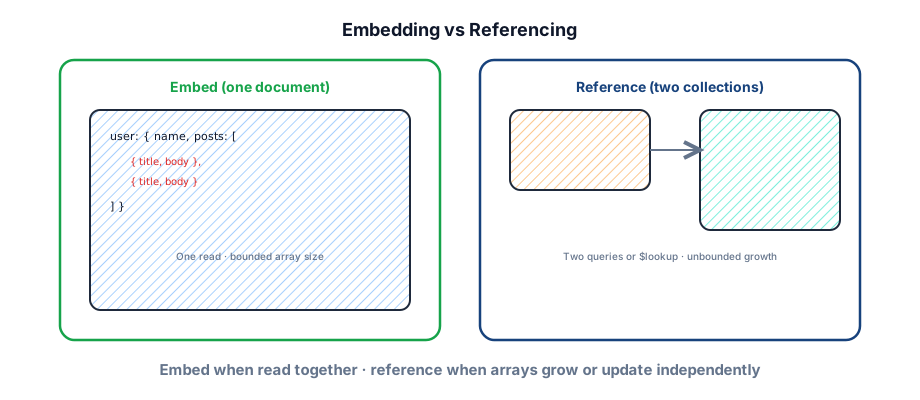
The core modeling decision: embed related data in one document or reference it across collections. Embed when you read data together and the array stays bounded; reference when arrays grow unbounded or update independently.
| Pattern | When | Watch out |
|---|---|---|
| Embed | Always loaded together; array < hundreds | 16 MB limit; rewrite whole doc on each push |
| Reference | Unbounded growth; independent lifecycle | Extra round trip or $lookup |
| Hybrid | Embed last N + reference full history | Keep the denormalized window consistent |
// Embed — product with a few reviews (read together)
db.products.insertOne({
  sku: "ABC-123",
  name: "Widget",
  reviews: [
    { user: "Evan", rating: 5, text: "Great" },
    { user: "Stefan", rating: 4, text: "Good" }
  ]
})

// Reference — messages by chat (unbounded)
db.messages.insertOne({
  chat_id: 1,
  user_id: ObjectId("64a000000000000000000101"),
  content: "Hi"
})

// Join at read time ($lookup — left outer join)
db.orders.aggregate([
  { $match: { status: "shipped" } },
  { $lookup: {
      from: "users",
      localField: "user_id",
      foreignField: "_id",
      as: "buyer"
  }},
  { $unwind: "$buyer" }
])Aggregation pipeline
Server-side data processing through stages — filter, transform, group, sort — without loading everything into the app. MongoDB's answer to SQL GROUP BY + many analytics shapes.
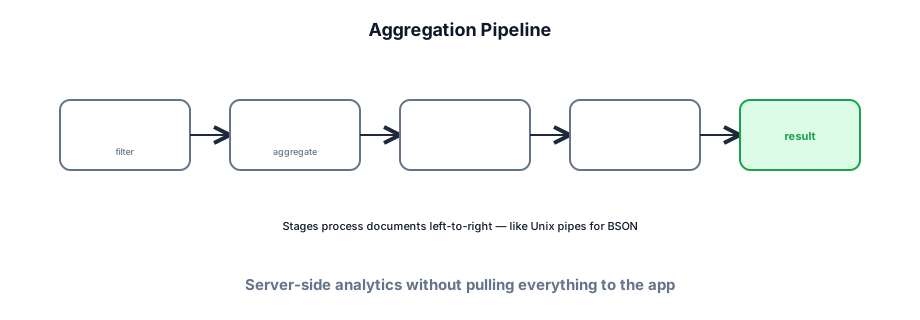
// Top posters per chat in the last 7 days
db.messages.aggregate([
  { $match: {
      created_at: { $gte: new Date(Date.now() - 7 * 86400000) }
  }},
  { $group: {
      _id: { chat_id: "$chat_id", user_id: "$user_id" },
      count: { $sum: 1 },
      last_msg: { $max: "$created_at" }
  }},
  { $sort: { count: -1 } },
  { $limit: 10 },
  { $project: {
      chat_id: "$_id.chat_id",
      user_id: "$_id.user_id",
      message_count: "$count",
      last_msg: 1,
      _id: 0
  }}
])

// Faceted search-style counts in one round trip
db.products.aggregate([
  { $match: { category: "shoes" } },
  { $facet: {
      byBrand: [{ $group: { _id: "$brand", n: { $sum: 1 } } }],
      priceStats: [{ $group: { _id: null, avg: { $avg: "$price" } } }],
      sample: [{ $limit: 5 }]
  }}
])Consistency
MongoDB tunables: write concern (how many nodes ack a write) and read concern (what snapshot you read). Not global settings — pass per operation. See Consistency models and CAP theorem.
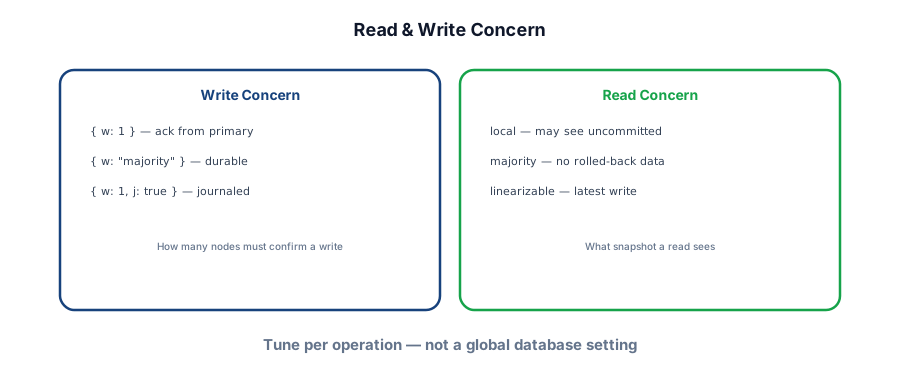
// Durable write
db.orders.insertOne(
  { user_id: 123, total: 4999 },
  { writeConcern: { w: "majority", j: true } }
)

// Strong read from primary
db.orders.findOne(
  { _id: orderId },
  { readConcern: { level: "majority" } }
)

// Analytics — stale OK, offload primary
db.messages.find({ chat_id: 1 })
  .readPref("secondaryPreferred")
Default posture: primary reads + w: majority for money paths; eventual secondary reads for dashboards. That's the interview-ready dial — not "Mongo is eventually consistent."
Replica sets
Production MongoDB runs as a replica set — one primary (writes) and secondaries (replicate via oplog). Automatic failover via election. Default recommendation: 3 nodes across availability zones.
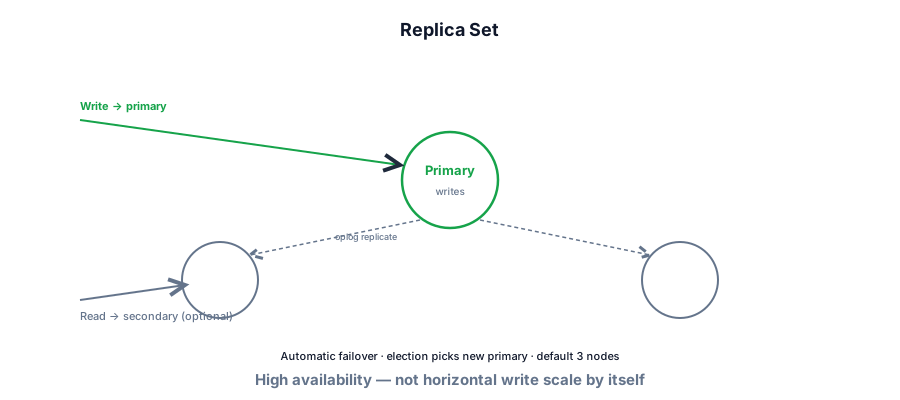
- Primary — all writes; default read target.
- Secondary — async replication via oplog; serve reads with
readPreference. - Arbiter — vote only, no data; cheap tiebreaker (less common now — prefer a data-bearing third member).
// Hands-on: init a 1-node replica set (needed for transactions & change streams locally)
// docker run ... mongo:7 --replSet rs0
// then in mongosh:
rs.initiate({
  _id: "rs0",
  members: [{ _id: 0, host: "localhost:27017" }]
})
rs.status()Sharding
When a single replica set hits storage or write throughput limits, shard the collection. A mongos router directs queries to shards based on the shard key — choose carefully; changing it later is painful. See Sharding.
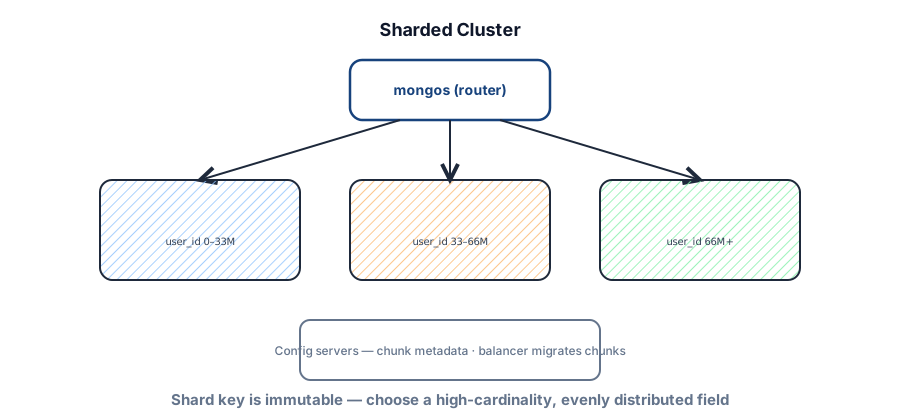
// Enable sharding on database
sh.enableSharding("chat_app")

// Hashed user_id — even write spread (Dynamo-like)
sh.shardCollection("chat_app.events", { user_id: "hashed" })

// Range-based for time-series / locality
sh.shardCollection("chat_app.logs", { created_at: 1, _id: 1 })Transactions
Multi-document ACID transactions (4.0+) across collections in the same replica set; sharded transactions from 4.2+. Use when you need atomicity across documents — but they carry overhead and require a replica set. Prefer single-document atomicity when modeling allows.
// mongosh / driver session API
const session = db.getMongo().startSession()
session.startTransaction()
try {
  const orders = session.getDatabase("shop").orders
  const inventory = session.getDatabase("shop").inventory
  orders.insertOne({ sku: "ABC", qty: 1 }, { session })
  inventory.updateOne(
    { sku: "ABC", stock: { $gte: 1 } },
    { $inc: { stock: -1 } },
    { session }
  )
  session.commitTransaction()
} catch (e) {
  session.abortTransaction()
  throw e
} finally {
  session.endSession()
}
Like DynamoDB's TransactWriteItems, this neutralizes the old "NoSQL means no transactions" critique — with the same advice: don't wrap every write in a transaction.
Change streams
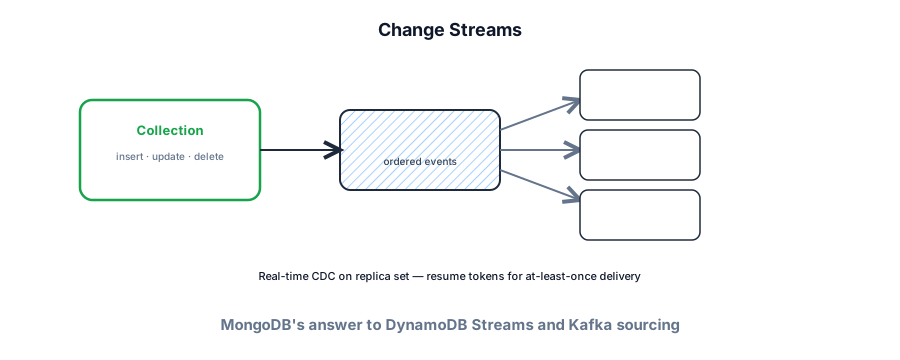
Real-time CDC on a collection, database, or deployment — backed by the replication oplog. Resume tokens for at-least-once delivery. MongoDB's parallel to DynamoDB Streams and Kafka sourcing.
const changeStream = db.messages.watch([
  { $match: { operationType: { $in: ["insert", "update"] } } }
], { fullDocument: "updateLookup" })

changeStream.on("change", (event) => {
  // Sync Elasticsearch, invalidate cache, push webhook
  console.log(event.operationType, event.fullDocument)
  // Persist event._id / resume token for crash recovery
})- Search sync — stream → worker → Elasticsearch / Atlas Search
- Cache invalidation — stream → delete Redis keys for changed docs
- Fan-out — stream → queue → notification service
Security and operations
- Auth — enable access control; SCRAM users / Atlas IAM-style roles; never expose an unauthenticated
mongodto the internet. - TLS — encrypt in transit; Atlas does this by default.
- Encryption at rest — WiredTiger encrypted storage / Atlas encryption; key management via KMS on cloud.
- Network — VPC peering / private endpoints on Atlas; bind IP allowlists.
- Backup — Atlas continuous backup; self-hosted via filesystem snapshots or
mongodump.
MongoDB Atlas is the managed path (AWS/GCP/Azure) — auto-backups, monitoring, global clusters. Self-hosted means you operate replica sets, upgrades, and capacity. In interviews: "3-node Atlas replica set, hashed shard key on user_id only if we outgrow one cluster" shows judgment without day-one over-engineering.
Cost and performance levers
MongoDB in an interview
When to use it
- Rapidly evolving or deeply nested document shapes (catalogs, CMS, profiles, UGC).
- Read patterns that fetch a document tree in one round trip.
- Richer ad-hoc queries than DynamoDB without going full SQL.
- Open-source / multi-cloud preference vs AWS lock-in.
- Horizontal scale via sharding after a replica set saturates.
When not to
- Heavy multi-table joins and ad-hoc analytics — Postgres or a warehouse.
- Strong relational integrity as the default — foreign keys aren't native.
- You'd embed unbounded arrays — 16 MB docs and rewrite storms.
- Pure key-value at extreme write scale on AWS — DynamoDB may be simpler ops.
| MongoDB | DynamoDB | Postgres | |
|---|---|---|---|
| Model | Documents | Items / attributes | Rows / relations |
| Access | Ad-hoc + indexes | PK/SK + GSI/LSI | SQL + planner |
| Transactions | Multi-doc (replica set) | Transact* (≤100 items) | Full ACID default |
| Scale writes | Shard key | Partitions / auto-split | Read replicas → shard later |
| Ops | Atlas or self-host | Fully managed AWS | Managed or self-host |
Document modeling drills
Failure modes to mention
Primary election lag, secondary lag on secondaryPreferred reads, hot shard from a bad key, COLLSCAN after a new query path ships without an index. Mitigate with timeouts, retries with jitter, and degraded read modes.
Interview Q&A by level
Match depth to the bar: define → trade off → operate. Don't dump principal answers in an entry-level screen.
Wrapping up
MongoDB trades relational rigidity for document flexibility and a rich query API. Interview credibility comes from schema choices (embed vs reference), index design, hands-on comfort with explain(), and knowing when replica sets vs sharding apply — not from calling it "NoSQL so it's fast."
Compare with DynamoDB (access-pattern-first AWS), PostgreSQL (interview default), Cassandra (write-heavy wide-column), Data modeling, and Key technologies.
How to answer this in a backend interview
Aggregate roots that match reads
Flexible schema, hierarchical data, secondary indexes
Multi-doc exists — don't pretend it's free
Shard key = access path; avoid scatter-gather
Earn the move — not 'NoSQL is modern'
I'd reach for Mongo when the natural unit of work is a document — a profile with nested preferences, a catalog item with variable attributes — and secondary indexes still matter. Schema flexibility is a feature and a footgun: I'd still enforce shape in the app. Transactions across documents exist but I'd design so the hot path is single-document. If we shard, the shard key must match the hottest query or we pay scatter-gather forever.
Related Lattice posts: Data modeling · PostgreSQL · Sharding · Consistency models