Why key technologies matter
Interviews reward a small, well-justified toolbox over a large, name-dropped one. Nobody cares if you pick Kafka or SQS â only that you have a queue you can reason about under pressure. The real failure mode is not knowing any queueing solution at all: async workloads become impossible to design, not just suboptimal.
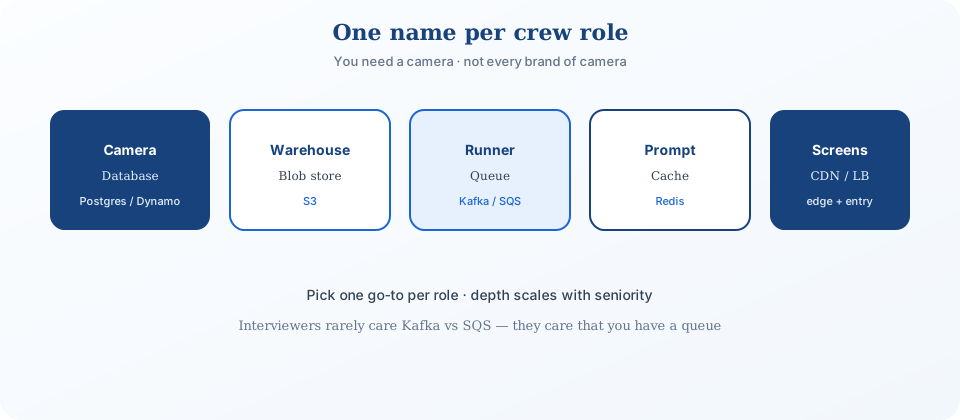
The categories below cover roughly 90% of interview problems. Pick within each category however you like â but show up with at least one name you actually know well.
- Core database (Postgres or DynamoDB)
- Blob storage (S3)
- Search database (Elasticsearch)
- API gateway · Load balancer
- Queue · Streams
- Distributed lock · Distributed cache · CDN
Already know the concepts? Start with Core concepts overview for the theory layer beneath these tools.
Core database
Almost every design stores data in a database or blob storage. The two real choices are relational (Postgres) and NoSQL (DynamoDB) â pick by the shape of the interview more than the specific problem.
- Mostly product design interviews â default to Postgres.
- Mostly infrastructure interviews â default to DynamoDB.
Good opener: "I'm using Postgres here because ACID transactions keep order and inventory consistent." If you're pushed to compare, compare databases you actually know â and say how each one would change the design, not which one wins in the abstract.
Relational databases (Postgres)
Reach for Postgres or MySQL when the data is transactional and the relationships matter: users, orders, bookings. Rows and columns, queried with SQL.
- Joins combine tables â clean at low volume, and the first thing to bottleneck once a table crosses a few million rows. Denormalize or cache before you consider a full migration.
- Indexes (B-tree, hash, multi-column, geospatial, full-text) are the actual scaling lever â build them for the query pattern, not the schema.
- Transactions make multi-row writes atomic: reserve seat, create payment intent, decrement inventory â all succeed or all roll back, never half.
Don't reach for Postgres when your access pattern is one huge table, always queried by a single key, at extreme write volume â that's a NoSQL problem, not a tuning problem. Otherwise: pick Postgres or MySQL. No preference? Postgres â every interviewer has an opinion about it, which works in your favor.
NoSQL databases (DynamoDB)
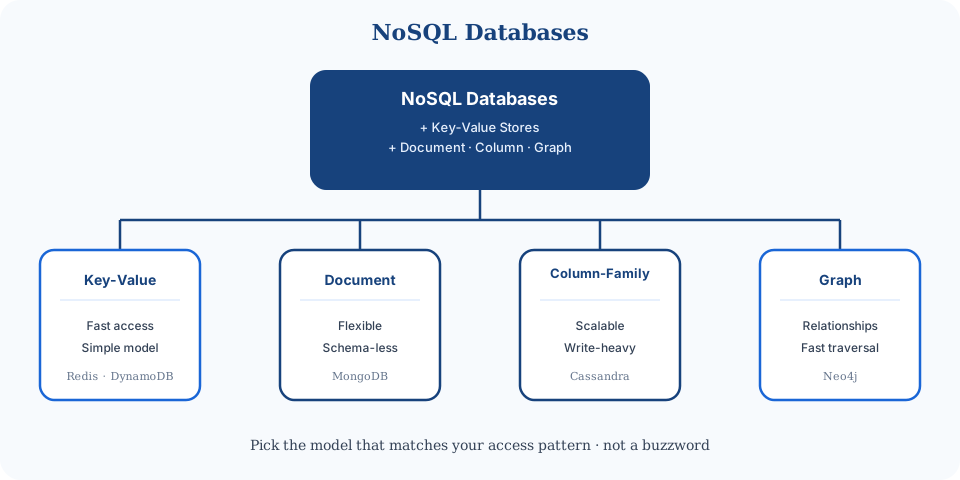
NoSQL covers key-value, document, column-family, and graph stores â schema-flexible, built for horizontal write scale.
- Data shapes evolve without a rigid schema to migrate.
- Horizontal scale across many servers for huge volume or traffic.
- Big data, real-time analytics, unstructured payloads.
- Data models â key-value, document, column-family, graph.
- Consistency â strong to eventual; pick per use case.
- Indexing â B-tree, hash, like relational but designed around access patterns.
- Scale â consistent hashing + sharding across nodes.
Common picks: DynamoDB (breadth, interview familiarity), Cassandra (write-heavy, append-only, fewer query guarantees in trade), MongoDB (document store). Failure mode: the moment your access pattern needs an ad-hoc query you didn't design a GSI for, latency and cost both spike. Constantly inventing new query shapes is the signal you actually wanted Postgres.
Blob storage (S3)
Images, videos, PDFs don't belong in Postgres or DynamoDB rows. Push them to S3, GCS, or Azure Blob â cheap, durable, and effectively infinite for interview purposes.
Pattern: DB stores pointers (URLs); blob store holds bytes. Query and index in the DB; serve bytes from S3 + CDN.
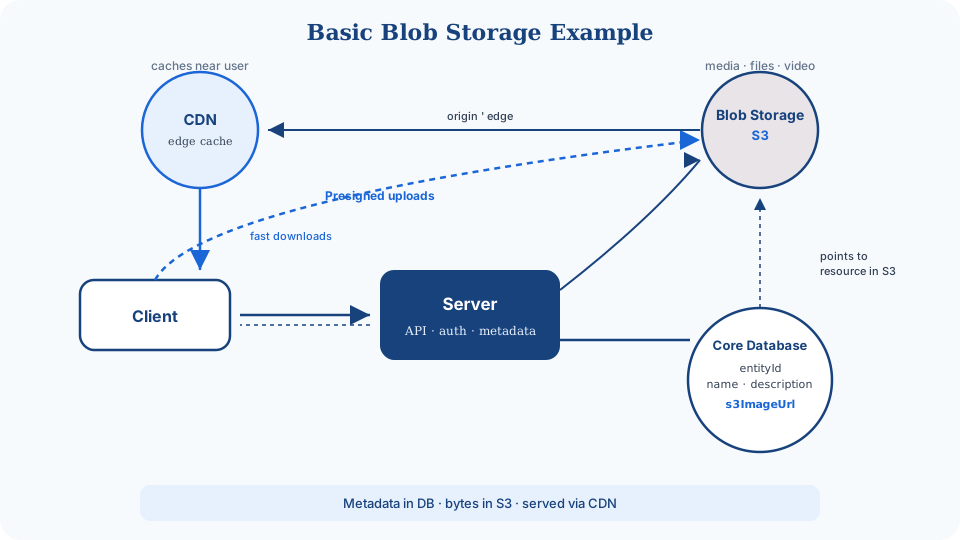
Upload flow (presigned URLs):
- Client asks server for presigned upload URL.
- Server returns URL + records pending upload in DB.
- Client uploads directly to S3.
- S3 notifies server; status â complete.
Download: server returns a presigned URL, client fetches via CDN, CDN proxies to S3 origin on a miss.
- Durability â replication, erasure coding.
- Cost â ~$0.023/GB/mo (S3) vs ~$1.25/GB/mo (DynamoDB) for the same data. That gap alone should keep large blobs out of your database.
- Presigned URLs â temporary upload/download access without exposing credentials.
- Multipart upload â chunk large files, resume on failure instead of restarting from zero.
Search-optimized database
WHERE text LIKE '%term%' scans every row â dies at scale. Search engines use inverted indexes instead: word â list of documents.
{
  "word1": [doc1, doc2, doc3],
  "word2": [doc2, doc3, doc4]
}
Look up the query token, get an instant candidate document list. Fast because you never touch the rows that don't match.
- Tokenization â split text into words.
- Stemming â "running" and "runs" both index as "run".
- Fuzzy search â tolerate typos via edit distance.
- Scale â cluster + sharding, like other DBs.
Leader: Elasticsearch (Lucene underneath). Don't stand up a whole Elasticsearch cluster for a search box hitting under ~10k rows â Postgres GIN full-text covers that without a second system to operate and page on. Reach for Redis search only for small, latency-critical lookups; it's not mature enough yet for heavy search workloads.
API gateway
In microservices â and most product designs â an API gateway is the front door: route GET /users/123 to the users service, handle auth, rate limits, logging, all before any business logic runs.
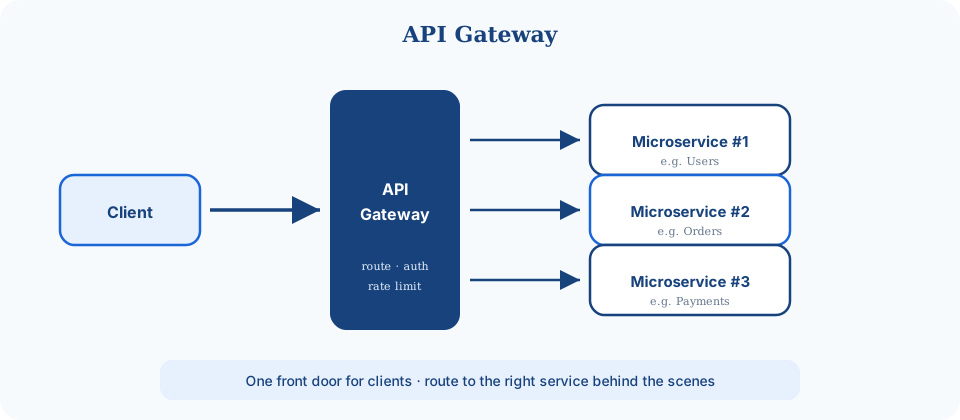
Interviewers rarely deep-dive gateway internals: draw the box, name the cross-cutting concerns, move on. Don't bother drawing one for a single-service toy design â a gateway earns its place once you actually have more than one service behind it.
Common options: AWS API Gateway, Kong, Apigee, or plain nginx/Apache, the way early Amazon did it.
Load balancer
Every box on your whiteboard should earn its place with a reason.
High traffic means spreading requests across machines. For most interviews, the load balancer is a black box that distributes work â you rarely need to go deeper than that.
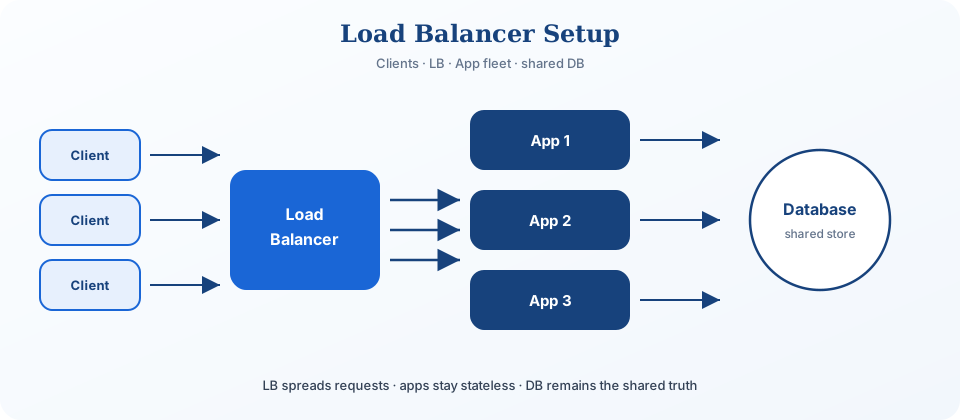
- L7 (application) â routes by HTTP path/content; flexible.
- L4 (TCP) â faster, dumber; use for WebSockets and other persistent connections.
- Rule of thumb: WebSockets â L4; otherwise â L7.
Common: AWS ELB, NGINX, HAProxy. Extreme traffic pushes you into hardware LB territory â rare in interviews, but a clean escape hatch if someone insists the LB itself is the bottleneck.
Queue
Queues buffer bursty traffic and decouple producers from consumers. The producer sends a message and moves on; workers process at their own pace.
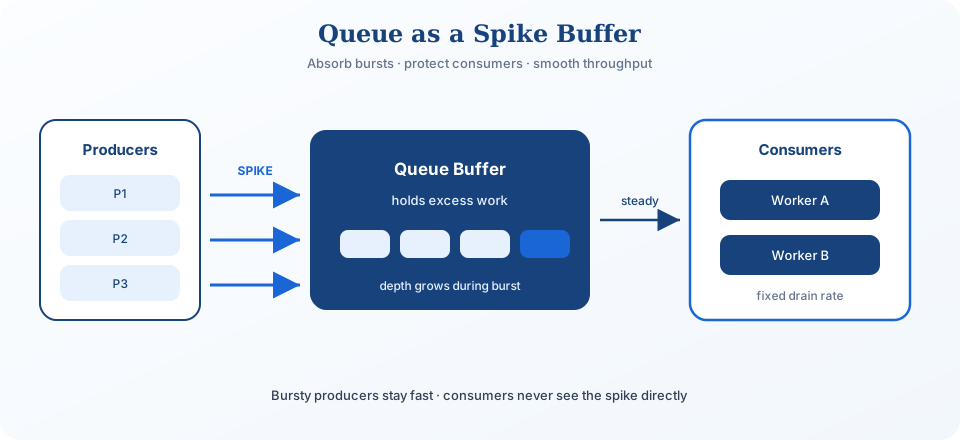
- FIFO ordering (most queues); Kafka allows partition-level ordering.
- Retries + dead-letter queues (DLQ) for poison messages.
- Partitions scale throughput â pick a partition key that keeps related messages together.
- Backpressure: a queue that grows forever means you're under-provisioned. Reject or slow producers instead of hoping it drains.
Common: Kafka (streaming + queue), SQS (managed, simple). â Full message queues article
Streams & event sourcing
Streams retain data for a configurable window â consumers can re-read from any point in time. Unlike a one-shot queue, a stream is a durable log.
- Real-time analytics â engagement events on a social feed.
- Event sourcing â bank transactions as replayable events; audit and reconstruct state.
- Pub/sub â one chat message, many room subscribers reading the same stream.
- Partitioning â scale like DB sharding.
- Consumer groups â same stream, different processing pipelines.
- Replication â fault tolerance.
- Windowing â hourly/daily aggregates for dashboards.
Common: Kafka, Flink, Kinesis.
Distributed lock
Need to hold a resource while one user completes checkout? DB row locks work for a transaction that finishes in milliseconds â not for a 10-minute cart hold sitting open while someone finds their wallet. Use a distributed lock instead (Redis, ZooKeeper).
- E-commerce â limited-edition sneaker checkout hold.
- Ride-sharing â lock a driver while the rider confirms the match.
- Cron jobs â only one server runs the daily aggregation.
- Auctions â lock an item during final bid processing.
- Expiry â a TTL auto-releases the lock if the process crashes; without one, a dead process holds the resource forever.
- Redlock â multi-Redis safe acquisition.
- Failure mode â deadlocks. Don't acquire locks in inconsistent order across services; always acquire in the same global order or you'll eventually deadlock two requests against each other.
Distributed cache (Redis)
Scale reads and cut latency by keeping hot data in memory. Redis or Memcached clusters sit beside your database, not instead of it.
- Eviction â LRU, FIFO, LFU when memory fills up.
- Invalidation â delete the cache entry the moment the underlying row changes.
- Write-through / write-around / write-back â pick consistency vs. speed deliberately, not by default.
- Data structures â a sorted set for leaderboards, not just keyâstring.
Pick: Redis (rich structures) or Memcached (simple strings). Don't cache first and measure never â a cache with no invalidation story just serves stale data confidently. â Caching strategies
CDN
A CDN caches content on edge servers near users. A request routes to the closest point of presence â a hit returns instantly, a miss fetches from origin, caches it, and returns.
- Static assets â images, video, JS (profile pics, video segments).
- Semi-dynamic â a blog post updated once daily; cache with a TTL.
- API responses â high-read, rarely-changing endpoints.
- TTL + invalidation when origin content changes.
Common: Cloudflare, Akamai, CloudFront. Don't cache anything personalized or write-heavy at the edge â a CDN serving a stale per-user cart page is a bug that files itself.