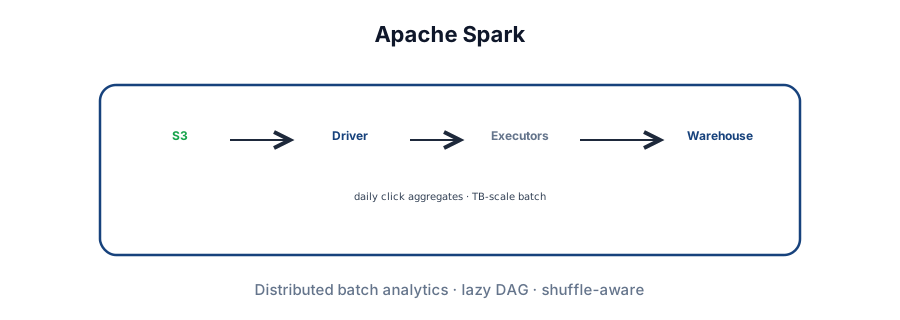
Why Spark
Many problems that look like stream processing can be batch jobs: daily click counts, nightly billing reconciliation, search index rebuilds. Apache Spark is the workhorse for that class — read from Kafka offsets or S3/HDFS, transform at scale, write to a warehouse or database.
Driver · Executors · DAG.
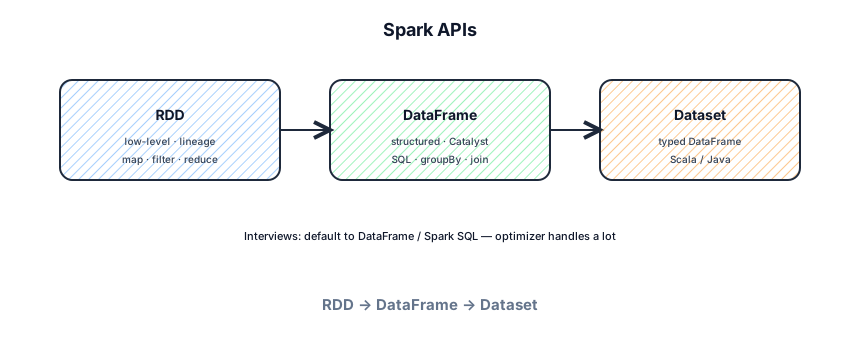
DataFrame / SQL first.
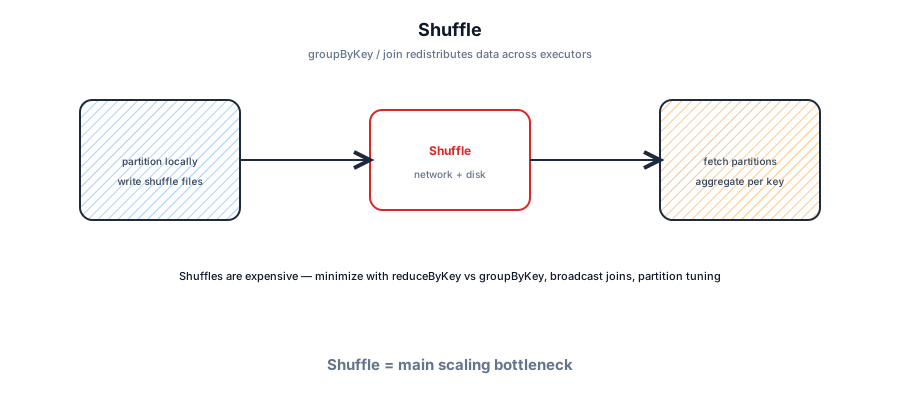
Shuffle = network + disk.
spark-submit · Spark UI.
Hands-on lab
Run Spark locally, submit a job, and open the Spark UI — same muscle memory you'd use on YARN/K8s.
# Option A: Docker (bitnami Spark 3.5)
docker run -it --rm \
  -p 4040:4040 -p 8080:8080 \
  bitnami/spark:3.5 spark-shell --master local[4]

# Option B: pip install for PySpark notebook / scripts
pip install pyspark==3.5.1

# Spark UI while a job runs
open http://localhost:4040
# save as daily_clicks.py then: spark-submit --master local[*] daily_clicks.py
from pyspark.sql import SparkSession
from pyspark.sql.functions import col, count
spark = SparkSession.builder.appName("lab-clicks").getOrCreate()
df = spark.createDataFrame([
("/", "chrome"), ("/", "bot"), ("/pricing", "chrome"),
("/pricing", "safari"), ("/", "firefox"),
], ["page", "user_agent"])
result = (
df.filter(col("user_agent") != "bot")
.groupBy("page")
.agg(count("*").alias("views"))
)
result.show()
result.explain(True) # logical + physical plan
spark.stop()A motivating example
You store raw click logs in S3 — billions of events per day. Product wants a dashboard of page views per URL, updated every morning. A single Postgres query won't scan terabytes. You need a distributed batch job: read logs, filter bots, group by URL, sum counts, load results into Snowflake or BigQuery.
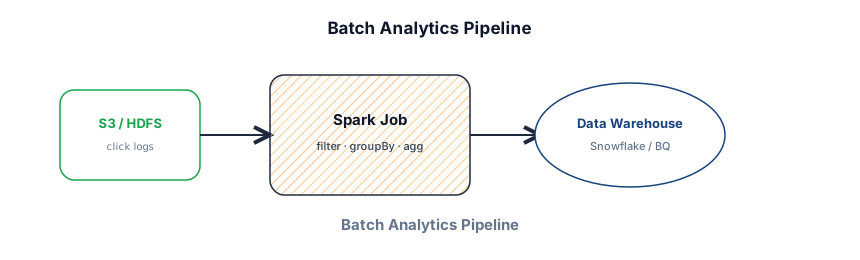
That's Spark's sweet spot: embarrassingly parallel transforms over data that already exists. Latency measured in minutes or hours, not milliseconds. Compare with Flink when you need continuous 5-minute windows with checkpointed state.
Basic concepts
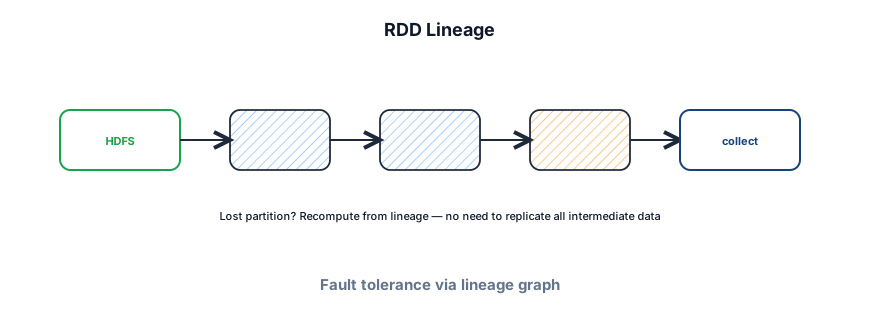
Spark programs build a directed acyclic graph (DAG) of transformations. Nothing runs until you hit an action (collect, count, write) — that's lazy evaluation. The optimizer can fuse narrow operations and plan shuffle boundaries before execution.
- Transformation — lazy; returns a new Dataset/DataFrame (map, filter, join, groupBy).
- Action — triggers execution; returns a result or writes output.
- Partition — chunk of data processed by one task; more partitions = more parallelism.
- Shuffle — redistributing data across executors (groupBy, join, repartition) — expensive.
- Lineage — record of how an RDD/DataFrame was built; used to recompute lost partitions.
Architecture
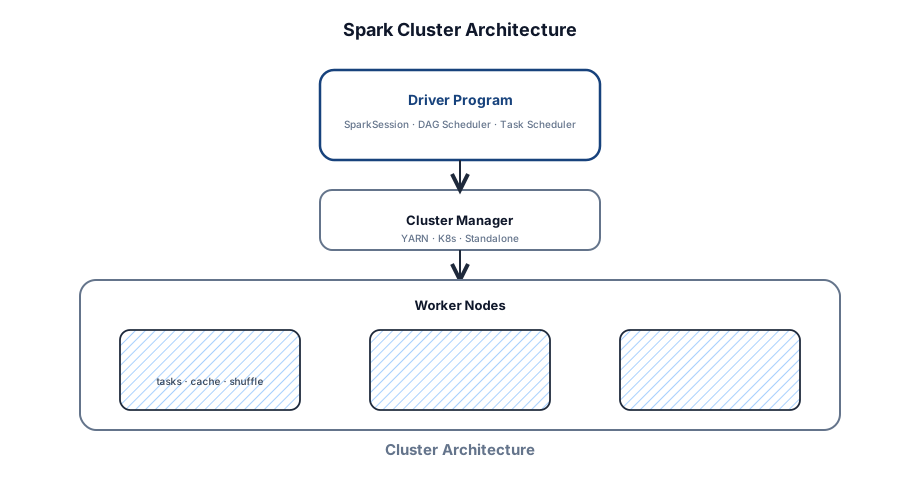
Spark runs as a distributed app: a Driver coordinates, Executors on worker nodes run tasks, and a Cluster Manager (YARN, Kubernetes, Mesos, or Spark standalone) allocates CPU and memory.
Core components
- Driver — runs your
main(), createsSparkSession/SparkContext, builds the logical plan, schedules stages, tracks task status, serves the Spark UI (port 4040). - Cluster Manager — negotiates containers/pods across apps. Spark asks for executors; YARN/K8s/standalone decides placement.
- Executor — long-lived JVM on a worker. Runs tasks in threads, stores cached blocks, writes shuffle spill files, reports heartbeats to the Driver.
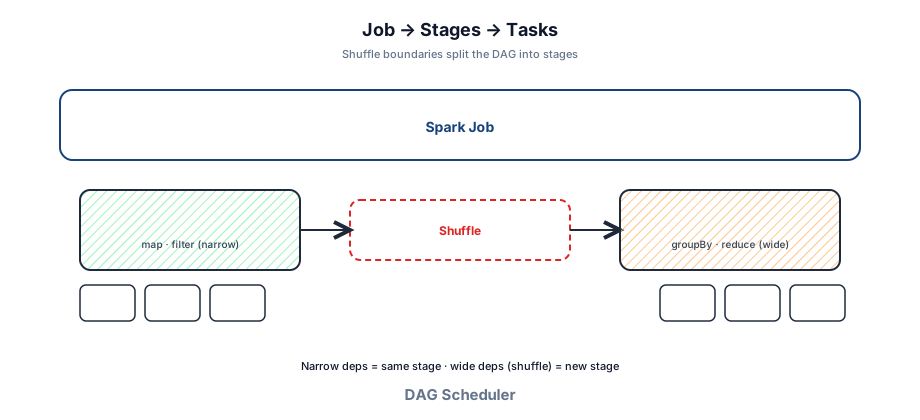
- DAG Scheduler — splits the logical plan into stages at shuffle (wide dependency) boundaries.
- Task Scheduler — assigns tasks within a stage to executors (locality-aware when possible).
Job → Stage → Task
One action creates one Job. The DAG Scheduler breaks it into Stages separated by shuffles. Each stage has many Tasks — typically one per partition. Failed tasks retry; lost executors recompute via lineage.
Deploy modes
--deploy-mode controls where the Driver runs — not where executors run.

- client — Driver on your machine / gateway. Logs stream to your terminal. Disconnecting kills the job. Fine for interactive shells and debugging.
- cluster — Driver runs inside the cluster. Survives laptop disconnect. Use for scheduled production jobs.
Executor memory
Each executor gets --executor-memory. Inside the JVM, Spark's unified memory region splits roughly into execution (shuffles, joins, sorts — can spill) and storage (cached DataFrames). Leave headroom for JVM overhead — don't set executor memory = full container size.

Execution flow (one submit)
- You run
spark-submit. - Driver starts, builds logical plan from your code.
- Driver asks Cluster Manager for executors.
- Action triggers → DAG Scheduler creates stages.
- Task Scheduler ships tasks to executors.
- Executors run tasks, shuffle when needed, write results.
- Driver tracks completion; UI updates on :4040.
- On failure: retry tasks; if executor dies, recompute from lineage.
Commands and CLI
Spark ships with shells and a submission tool. Naming spark-submit and key flags shows you've operated real clusters — interviewers notice.
spark-submit (production entry point)
# PySpark job on YARN — cluster deploy mode
spark-submit \
  --master yarn \
  --deploy-mode cluster \
  --name daily-click-agg \
  --num-executors 20 \
  --executor-cores 4 \
  --executor-memory 8g \
  --driver-memory 4g \
  --conf spark.sql.shuffle.partitions=400 \
  --conf spark.serializer=org.apache.spark.serializer.KryoSerializer \
  --conf spark.sql.adaptive.enabled=true \
  --files s3://jobs/config/prod.json \
  --py-files s3://jobs/lib/helpers.zip \
  s3://jobs/daily_clicks.py \
  --date 2026-07-21

# Scala/Java JAR
spark-submit \
  --class com.acme.DailyClicks \
  --master yarn --deploy-mode cluster \
  --executor-memory 8g --executor-cores 4 --num-executors 20 \
  s3://jobs/analytics-1.2.0.jar --date 2026-07-21

# Kubernetes
spark-submit \
  --master k8s://https://kubernetes.default.svc \
  --deploy-mode cluster \
  --conf spark.kubernetes.container.image=acme/spark:3.5 \
  --conf spark.executor.instances=10 \
  local:///opt/spark/jobs/daily_clicks.py

# Local mode for dev
spark-submit --master local[*] --driver-memory 2g daily_clicks.py
Interactive shells
# Scala REPL
spark-shell --master local[4]
spark-shell --master yarn --num-executors 5 --executor-memory 4g

# Python REPL
pyspark --master local[*]
pyspark --master yarn --num-executors 5

# SQL-only
spark-sql --master local[*]
spark-sql -e "SELECT page, COUNT(*) FROM parquet.\`s3://logs/clicks/\` GROUP BY page LIMIT 10"

# Inside spark-shell / pyspark
:help          # Scala shell help
spark.version
spark.conf.get("spark.sql.shuffle.partitions")
spark.sparkContext.uiWebUrl
Flag and config cheat sheet
| Flag / conf | What it does | Interview tip |
|---|---|---|
--master | yarn, k8s://…, local[N], spark://host:7077 | Name the manager you assume |
--deploy-mode | client vs cluster | Production → cluster |
--num-executors | How many executor JVMs | Scale with data size |
--executor-cores | Threads per executor (often 4–5) | Too many → GC thrash |
--executor-memory | Heap per executor | Leave ~10% for overhead |
--driver-memory | Driver heap | Raise if collecting small results |
spark.sql.shuffle.partitions | Post-shuffle partitions (default 200) | ~2–3× total cores |
spark.default.parallelism | Default for RDD ops | Less critical with DataFrames |
spark.sql.adaptive.enabled | AQE — dynamic coalesce/skew join | On by default in Spark 3.2+ |
spark.serializer | Often Kryo | Faster than Java serializer |
Monitoring and history
# Live Spark UI (Driver) — while app runs
# http://<driver-host>:4040
#   Jobs / Stages — shuffle read/write, spill, stragglers
#   Executors — memory, GC time, active tasks
#   SQL — query plan visualization

# Event logs for History Server (after job exits)
# spark-defaults.conf:
#   spark.eventLog.enabled true
#   spark.eventLog.dir hdfs:///spark-history
#   spark.history.fs.logDirectory hdfs:///spark-history

$SPARK_HOME/sbin/start-history-server.sh
# UI typically :18080

# YARN (if on Hadoop)
yarn application -list
yarn logs -applicationId application_123_0001
yarn application -kill application_123_0001
Useful DataFrame / shell commands
df.printSchema()
df.show(20, truncate=False)
df.count()
df.explain(True)                    # parsed / analyzed / optimized / physical
df.cache(); df.count()              # materialize cache
df.unpersist()

# Partitioning
df.rdd.getNumPartitions()
df.repartition(200)                 # full shuffle
df.coalesce(20)                     # shrink without full shuffle

# Join hint
from pyspark.sql.functions import broadcast
df.join(broadcast(dim), "id")

# Write
df.write.mode("overwrite").partitionBy("dt").parquet("s3://wh/table/")
df.write.mode("append").saveAsTable("analytics.page_views")Code examples
Modern Spark uses SparkSession and DataFrames. SQL and the DataFrame API compile to the same plan via the Catalyst optimizer and execute via Tungsten (codegen + off-heap where possible).
from pyspark.sql import SparkSession
from pyspark.sql.functions import col, count, sum as spark_sum

spark = SparkSession.builder \
    .appName("DailyClickAgg") \
    .config("spark.sql.adaptive.enabled", "true") \
    .getOrCreate()

clicks = spark.read.json("s3://logs/clicks/2026/07/21/")

page_views = (
    clicks
    .filter(col("user_agent") != "bot")
    .groupBy("page")
    .agg(
        count("*").alias("views"),
        spark_sum("duration_ms").alias("total_ms")
    )
)

page_views.write \
    .mode("overwrite") \
    .partitionBy("page") \
    .parquet("s3://warehouse/page_views/dt=2026-07-21/")

spark.stop()
Spark SQL
CREATE OR REPLACE TEMP VIEW clicks AS
  SELECT * FROM parquet.`s3://logs/clicks/`;

SELECT page, COUNT(*) AS views
FROM clicks
WHERE user_agent != 'bot'
GROUP BY page
ORDER BY views DESC
LIMIT 100;
Batch read from Kafka
# Nightly batch pull of a Kafka topic range
df = spark.read.format("kafka") \
    .option("kafka.bootstrap.servers", "broker:9092") \
    .option("subscribe", "clicks") \
    .option("startingOffsets", "earliest") \
    .option("endingOffsets", "latest") \
    .load()

# For continuous micro-batches see Structured Streaming
# → /post/spark-streaming
Performance patterns
- Prefer
groupBy + aggovergroupByKey— combine locally before shuffle. - Broadcast small tables (
broadcast(dim)) — avoid shuffling the large side. - Cache (
.cache()) only if reused multiple times — costs executor memory. - Use Parquet/ORC — predicate pushdown and column pruning.
- Watch skew — salting keys or AQE skew join (Spark 3+).
- Never
collect()a large DataFrame to the Driver.
Spark vs other engines
Spark owns batch analytics — ETL, nightly aggregates, ML feature pipelines, backfills. For streaming, read Structured Streaming (micro-batch, minute-level) then Flink (true streaming, sub-second). Hadoop MapReduce is legacy; Spark replaced it for new designs.
| Spark batch | Structured Streaming | Flink | |
|---|---|---|---|
| Latency | Minutes–hours | Seconds–minutes | Sub-second–seconds |
| Model | Bounded datasets | Micro-batches | True streaming + state |
| Interview default | Nightly ETL | Near-real-time dashboards | Fraud / CEP / windows |
Spark in an interview
What to explain
- Driver + Executors + Cluster Manager — who does what.
- Lazy DAG → stages at shuffle boundaries → tasks per partition.
- Shuffle is the bottleneck — partition count, skew, broadcast joins.
- DataFrame/SQL over RDD unless they ask otherwise.
- Fault tolerance via lineage, not replication of every intermediate.
spark-submit+ cluster deploy mode + Spark UI for debugging.
Sample design snippet
"Raw events land in S3 partitioned by date. A nightly spark-submit job (YARN, cluster mode) reads Parquet, dedupes by event_id, aggregates DAU/MAU, writes to BigQuery. Kafka is the real-time path for the live dashboard; Spark is the source of truth for analytics. If a job fails, rerun from S3 — idempotent overwrite by partition."
Common pitfalls
- Using Spark for OLTP or low-latency API serving.
- Too few shuffle partitions on huge data — giant tasks, OOM.
- Too many shuffle partitions on small data — scheduler overhead.
collect()on big results — blows driver memory.- Forgetting that actions trigger execution — debug with
.explain()or Spark UI. - Client deploy mode for long production jobs — laptop disconnect kills Driver.
Cost and performance levers
Batch job interview example
Failure modes to mention
Executor OOM (raise memory / fix skew), shuffle spill storm, Driver collect OOM, spot interruption (lineage retry), S3 eventual consistency on list (use commit protocols / warehouse tables).
Interview Q&A by level
Match depth to the bar: define → trade off → operate.
Wrapping up
Spark is the default batch analytics engine for system design: Driver coordinates, Executors parallelize, shuffles define your scaling limits. Know architecture (Job → Stage → Task), spark-submit flags, DataFrame/SQL, and when to reach for Flink instead.
Compare with Spark Structured Streaming (near-real-time), Apache Flink (true streaming), Apache Kafka (source log), Elasticsearch (search indexing), and Key technologies.