Why Structured Streaming
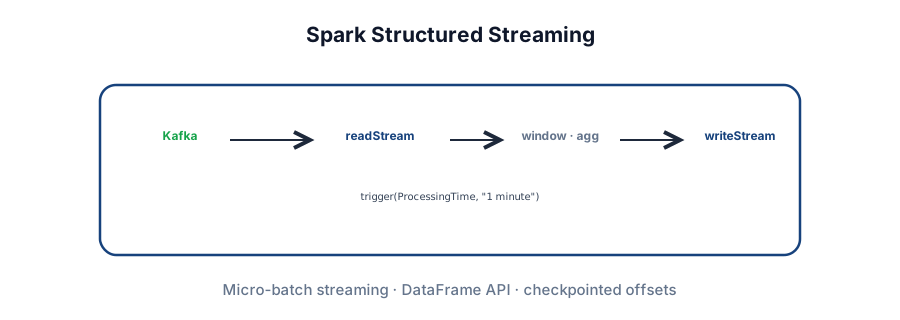
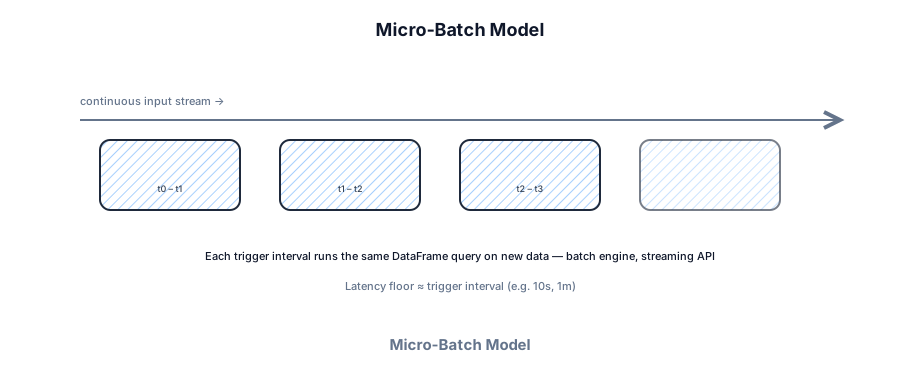
Structured Streaming replaced legacy DStreams (RDD-based, low-level). The mental model: a stream is an unbounded table; each trigger adds new rows; your query is incremental. Same Catalyst optimizer and DataFrame API as batch Spark — one stack for nightly ETL and near-real-time pipelines.
Micro-batch table.
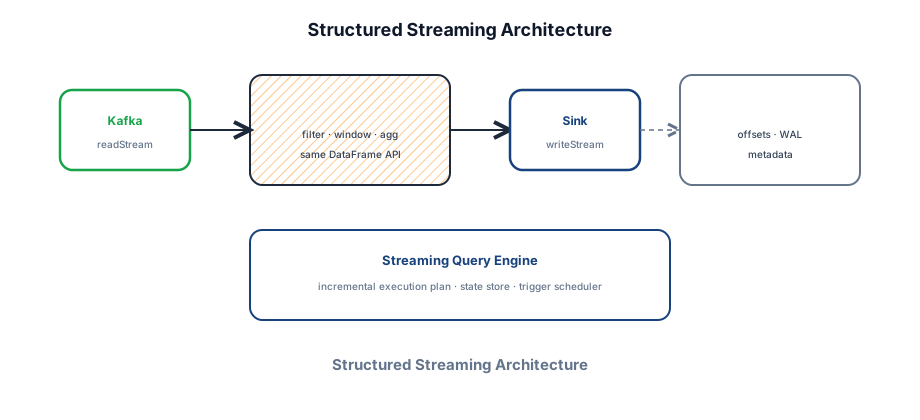
readStream · writeStream.
Checkpoint dir.
Hands-on lab
Run a local rate source → window → console sink, then open the Streaming tab in the Spark UI.
# Local Spark with UI
pip install pyspark==3.5.1
# or: docker run -it --rm -p 4040:4040 bitnami/spark:3.5 ...
# save as rate_lab.py → spark-submit --master local[2] rate_lab.py
from pyspark.sql import SparkSession
from pyspark.sql.functions import window, count, col
spark = SparkSession.builder.appName("ss-lab").getOrCreate()
# Built-in rate source — no Kafka needed for the lab
rates = spark.readStream \
.format("rate") \
.option("rowsPerSecond", 5) \
.load()
agg = rates \
.withWatermark("timestamp", "10 seconds") \
.groupBy(window(col("timestamp"), "10 seconds")) \
.agg(count("*").alias("n"))
query = agg.writeStream \
.outputMode("update") \
.format("console") \
.option("truncate", False) \
.trigger(processingTime="5 seconds") \
.option("checkpointLocation", "/tmp/ss-lab-chk") \
.start()
print(query.status)
query.awaitTermination(60) # run ~1 minute then Ctrl+C
# Open http://localhost:4040 → Streaming tabA motivating example
Click events stream into Kafka. Product wants page-view counts refreshed every minute — not daily batch, but sub-second latency isn't required either. A plain Kafka consumer could count in memory, but crash recovery and scale-out state are painful.
Structured Streaming reads Kafka every minute, aggregates by page, writes to Redis or Postgres. A checkpoint directory stores Kafka offsets and query metadata — restart picks up where it left off.
Architecture
A streaming query has three parts: source (readStream), transformations (same DataFrame ops as batch), and sink (writeStream). The engine maintains a checkpoint location for fault tolerance and offset tracking. Under the hood it still uses a Driver + Executors like batch Spark — each trigger is a mini Spark job.
- Streaming query — long-running job started by
.start(); runs until.awaitTermination()or killed. - Trigger — how often to process new data (default: as-soon-as-possible; set explicitly in interviews).
- Checkpoint location — durable dir (S3/HDFS) storing offsets, WAL, and aggregator state. Required for recovery and most aggregations.
- State store — RocksDB-backed keyed state for aggregations and stream-stream joins across batches.
- Incremental execution — Spark plans which parts of the query can reuse prior batch results.
- Progress reporter —
query.lastProgress/ Spark UI Streaming tab: input rate, batch duration, lag.
Micro-batch lifecycle
- Trigger fires (timer or available data).
- Source reads a bounded set of new offsets (capped by
maxOffsetsPerTrigger). - Transformations run as a normal Spark job (stages, shuffle, tasks).
- Sink commits results.
- Checkpoint updates offsets + state — then next trigger.
Core API
Every streaming job follows: create SparkSession → readStream → transform → writeStream with options → start → awaitTermination.
from pyspark.sql import SparkSession
from pyspark.sql.functions import from_json, col, window, count
from pyspark.sql.types import StructType, StringType, TimestampType

spark = SparkSession.builder \
    .appName("PageViews") \
    .config("spark.sql.shuffle.partitions", "100") \
    .getOrCreate()

schema = StructType() \
    .add("page", StringType()) \
    .add("event_ts", TimestampType())

# --- Source: Kafka ---
raw = spark.readStream \
    .format("kafka") \
    .option("kafka.bootstrap.servers", "broker:9092") \
    .option("subscribe", "clicks") \
    .option("startingOffsets", "latest") \
    .option("failOnDataLoss", "false") \
    .load()

events = raw.select(
    from_json(col("value").cast("string"), schema).alias("data")
).select("data.*")

# --- Transform: 1-minute tumbling window ---
page_views = events \
    .withWatermark("event_ts", "2 minutes") \
    .groupBy(window(col("event_ts"), "1 minute"), col("page")) \
    .agg(count("*").alias("views"))

# --- Sink ---
query = page_views.writeStream \
    .outputMode("update") \
    .format("console") \
    .option("truncate", False) \
    .trigger(processingTime="1 minute") \
    .option("checkpointLocation", "s3://checkpoints/page_views/") \
    .queryName("page_views_1m") \
    .start()

print(query.status)
print(query.lastProgress)
query.awaitTermination()
Key methods
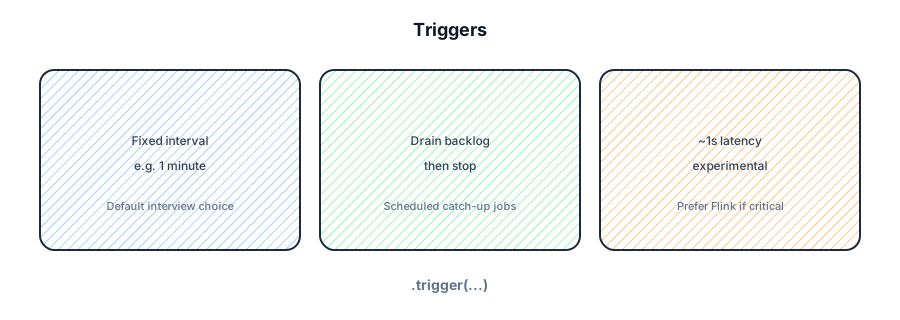
spark.readStream— streaming DataFrame from Kafka, files, socket, rate, Delta, etc..writeStream— define sink, mode, trigger, checkpoint; then.start()..trigger(processingTime="10 seconds")— fixed micro-batch interval..trigger(availableNow=True)— process all available data then stop (Spark 3.3+; replacesonce)..trigger(continuous="1 second")— experimental low-latency; limited operators..option("checkpointLocation", path)— required for fault tolerance and aggregations.query.status/query.lastProgress/query.stop()— ops hooks.
Output modes
outputMode controls what rows the sink receives each trigger.
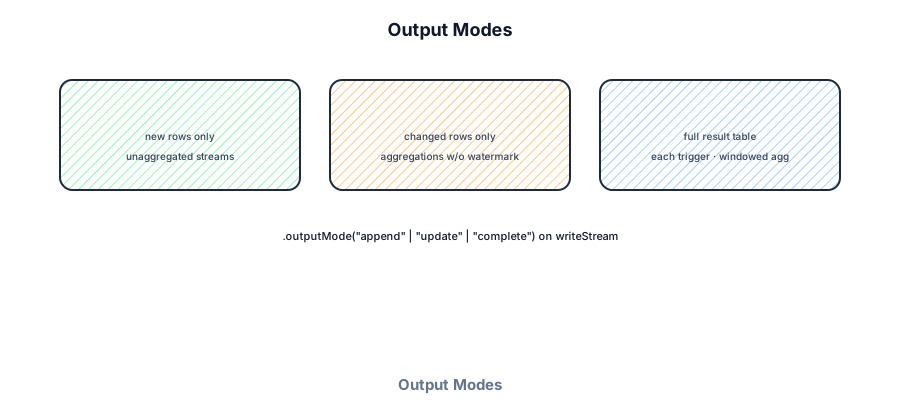
- Append — only new rows since last trigger. Non-aggregated queries; aggregations need watermarks so Spark knows a window is closed.
- Update — only rows that changed (count 5 → 6). Natural for running aggregations.
- Complete — entire result table every trigger. Use for small outputs (top-N dashboards).
Event time and watermarks
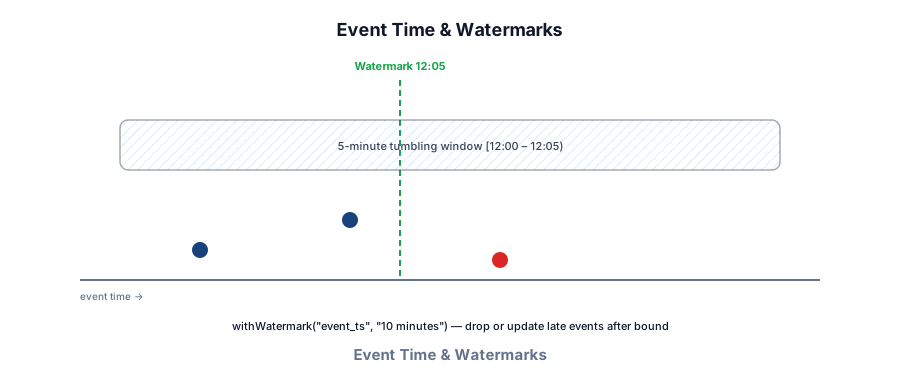
By default Spark uses processing time (when the engine sees the row). For correct analytics on delayed events, use an event time column and withWatermark.
# Event-time sliding window with lateness bound
events \
  .withWatermark("event_ts", "10 minutes") \
  .groupBy(
      window(col("event_ts"), "30 minutes", "5 minutes"),  # size, slide
      col("user_id")
  ) \
  .agg(count("*").alias("events"))
Watermark ≈ max event time seen − delay threshold. Rows later than the watermark drop from state (unless you add a separate batch correction job). Same trade-off as Flink watermarks, but updated once per micro-batch — so watermark lag has a floor of one trigger interval.
Sinks and foreachBatch
Built-in sinks: Kafka, console, memory, file (Parquet/JSON), foreach/foreachBatch. File sinks are append-only and great for lakehouse landing zones.
# Parquet landing zone (append)
page_views.writeStream \
    .outputMode("append") \
    .format("parquet") \
    .option("path", "s3://lake/page_views/") \
    .option("checkpointLocation", "s3://chk/page_views_files/") \
    .partitionBy("page") \
    .trigger(processingTime="5 minutes") \
    .start()

# foreachBatch — custom sink (Postgres upsert, Redis, API)
def write_to_pg(batch_df, batch_id):
    # Idempotent upsert keyed by (window, page)
    batch_df.write \
        .format("jdbc") \
        .option("url", "jdbc:postgresql://db/analytics") \
        .option("dbtable", "page_views") \
        .option("user", "spark") \
        .mode("append") \
        .save()  # prefer MERGE/upsert in real code

page_views.writeStream \
    .outputMode("update") \
    .foreachBatch(write_to_pg) \
    .option("checkpointLocation", "s3://chk/page_views_pg/") \
    .trigger(processingTime="1 minute") \
.start()Streaming joins
Stream–static joins enrich events with slowly changing dimensions. Stream–stream joins need watermarks on both sides and a time range — state can grow; set watermarks carefully.
# Stream + static (broadcast-friendly dims)
users = spark.read.parquet("s3://dim/users/")  # refreshed periodically
enriched = clicks_stream.join(users, "user_id", "left")

# Stream–stream within 10 minutes (both need watermarks)
clicks_w = clicks.withWatermark("event_ts", "10 minutes")
purchases_w = purchases.withWatermark("event_ts", "10 minutes")

joined = clicks_w.join(
    purchases_w,
    expr("""
      clicks.user_id = purchases.user_id AND
      purchases.event_ts >= clicks.event_ts AND
      purchases.event_ts <= clicks.event_ts + interval 10 minutes
    """)
)Kafka and exactly-once
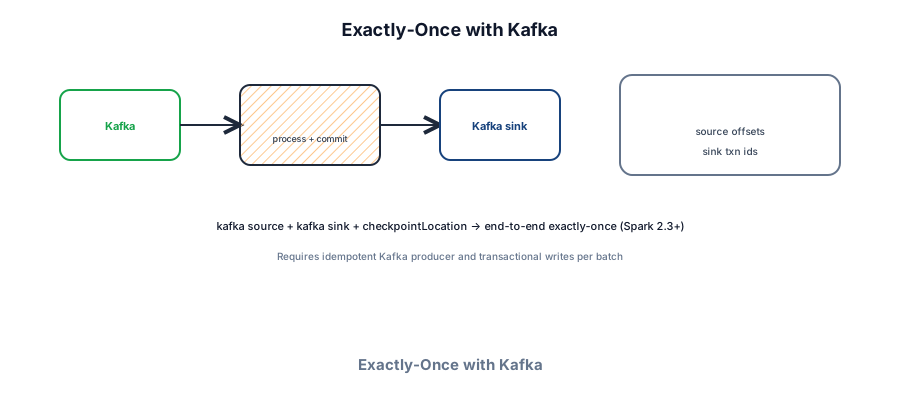
Most interview designs start from Kafka. Structured Streaming tracks consumer offsets in the checkpoint and can write to Kafka with transactional / idempotent guarantees when configured.
# Kafka → transform → Kafka
parsed.writeStream \
    .format("kafka") \
    .option("kafka.bootstrap.servers", "broker:9092") \
    .option("topic", "alerts") \
    .option("checkpointLocation", "s3://chk/alerts/") \
    .outputMode("update") \
.start()- Checkpoint stores source offsets per partition — restart resumes correctly.
- Kafka sink can use batch id for idempotent writes when transactional producers are enabled.
- External JDBC sinks still need upsert/merge — not automatic exactly-once.
- Kafka retention must cover downtime — same constraint as Flink checkpoint rewind.
- Throttle catch-up with
maxOffsetsPerTriggerso a huge lag doesn't OOM one batch.
Commands and operations
Streaming jobs submit like batch jobs via spark-submit. They run forever — plan monitoring, graceful kill, and checkpoint-backed restart.
# Submit long-running streaming job (cluster mode)
spark-submit \
  --master yarn \
  --deploy-mode cluster \
  --name page-views-ss \
  --num-executors 12 \
  --executor-cores 4 \
  --executor-memory 8g \
  --conf spark.sql.shuffle.partitions=100 \
  --conf spark.sql.streaming.kafka.maxOffsetsPerTrigger=500000 \
  --conf spark.sql.streaming.stateStore.providerClass=\
org.apache.spark.sql.execution.streaming.state.RocksDBStateStoreProvider \
  page_views_stream.py

# Local debug
spark-submit --master local[4] --driver-memory 2g page_views_stream.py

# Kill gracefully (checkpoint allows clean restart)
yarn application -kill application_xxx
# or query.stop() from a side channel / admin endpoint
Useful streaming configs
| Config | Role |
|---|---|
checkpointLocation | Offsets + state + metadata (required) |
spark.sql.streaming.kafka.maxOffsetsPerTrigger | Cap ingest per micro-batch |
spark.sql.streaming.minBatchesToRetain | State store cleanup for joins |
spark.sql.streaming.stateStore.providerClass | RocksDB for large keyed state |
spark.sql.streaming.stopTimeout | Graceful shutdown window |
failOnDataLoss (Kafka) | false if retention may drop offsets |
Monitoring in code
query = ... .start()

# Poll progress
while query.isActive:
    p = query.lastProgress
    if p:
        print(p["batchId"], p["inputRowsPerSecond"], p["processingTimeMs"])
    query.awaitTermination(10)

# Spark UI :4040 → Streaming tab
#   Input rate, scheduling delay, processing time, watermark
File source (log landing)
spark.readStream \
    .format("json") \
    .schema(schema) \
    .option("maxFilesPerTrigger", 10) \
    .option("latestFirst", "false") \
.load("s3://logs/incoming/")Structured Streaming vs Flink
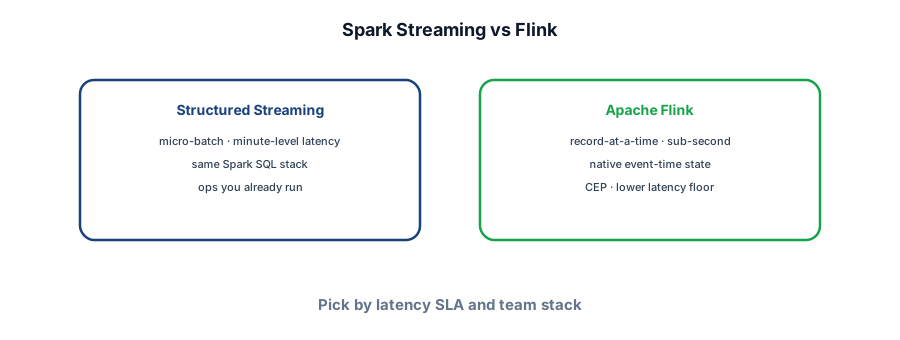
| Dimension | Structured Streaming | Flink |
|---|---|---|
| Execution | Micro-batch | Continuous / native streaming |
| Typical latency | Seconds–minutes | Milliseconds–seconds |
| API | Spark SQL / DataFrame | DataStream / Table API |
| State | Checkpoint + state store | Checkpoint barriers, RocksDB |
| Best when | Already on Spark; minute dashboards; unified batch+stream | CEP, strict event-time, low-latency fraud |
In your interview
When to propose it
- Near-real-time ETL where batch Spark already exists.
- Minute-level KPIs from Kafka (DAU counters, error rates).
- Unified SQL over batch history + live stream (stream–static join).
- Latency SLA ≥ trigger interval (usually 10s–5m).
When not to
- Sub-second fraud or trading — use Flink or custom consumers.
- Simple transform-and-write — a Kafka consumer is enough.
- Complex CEP (small-then-large patterns) — Flink CEP is richer.
Pitfalls to mention
- Forgetting
checkpointLocation— no recovery after Driver restart. - Processing-time windows when events arrive late — wrong counts.
- Complete mode on large aggregation output — sink overload.
- Too aggressive trigger on huge Kafka lag — micro-batch OOM.
- Non-idempotent JDBC insert inside foreachBatch — duplicates after retry.
Cost and performance levers
Micro-batch mental model
Failure modes to mention
Driver loss (restart from checkpoint), Kafka lag spike (throttle offsets), state store blow-up (tighten watermark / TTL), sink downtime (pause or buffer to Kafka first), watermark stall (upstream clock skew).
Interview Q&A by level
Match depth to the bar: define → trade off → operate.
Wrapping up
Structured Streaming is Spark's answer to "good enough" streaming: same DataFrame API, micro-batch execution, checkpointed Kafka offsets. Know architecture, triggers, watermarks, output modes, foreachBatch, and when Flink wins on latency.
Compare with Apache Spark (batch), Kafka, Flink, and Key technologies.