Why Kafka
There's a good chance you've heard of Kafka — used by a large share of the Fortune 100. If it scales the biggest companies, it's probably fair game for your next system design interview.
Apache Kafka is an open-source distributed event streaming platform that works as either a message queue or a stream processing backbone. It's engineered for high performance, scalability, and durability. With proper replication and acknowledgment settings, it provides strong guarantees against message loss.
This deep dive takes a top-down path: zoomed-out motivation first, then terminology, internals, a broker comparison (Kafka vs other queues and streams), and the interview topics seniors get pressed on. Know the basics? Skip to How it works or In your interview.
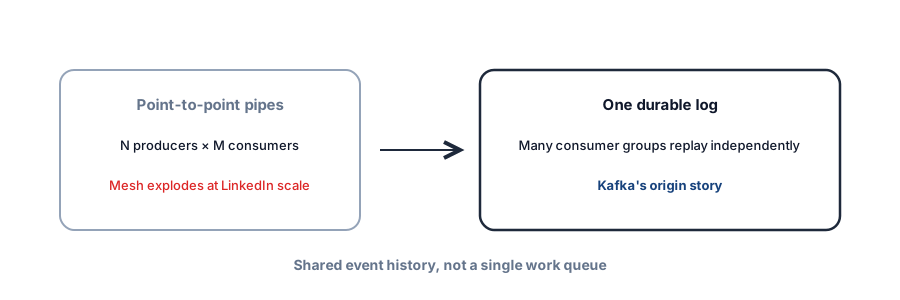
Topics · partitions · offsets.
Per-partition, keyed by you.
Consumer groups · more brokers.
Not a blob store · not always-on consistent.
Analogy: numbered airport luggage belt
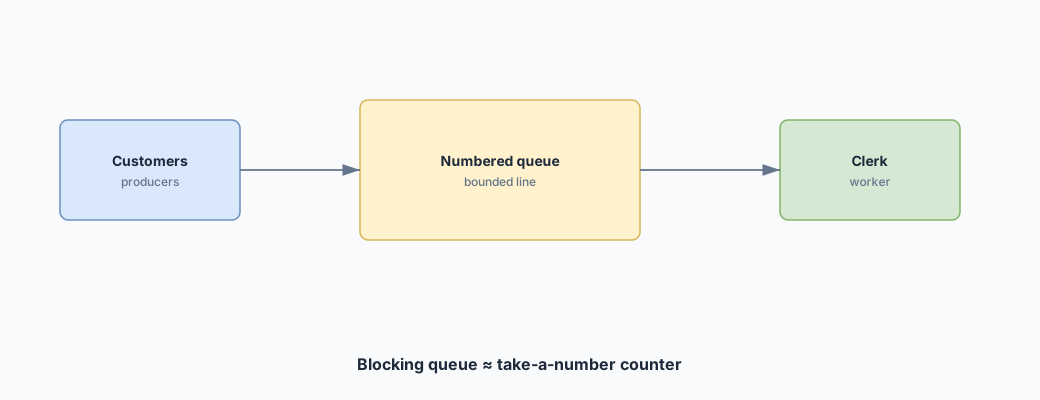
Kafka is an airport baggage belt with permanent markers: bags (records) are appended in order on a partition. Consumers remember their offset — how far along the belt they’ve walked — so they can replay or catch up.
A motivating example
It's the World Cup. We run a website with real-time match statistics — every goal, booking, and substitution updates the site. Events land on a queue when they occur. The server that writes events is the producer; the server that reads and updates the site is the consumer.
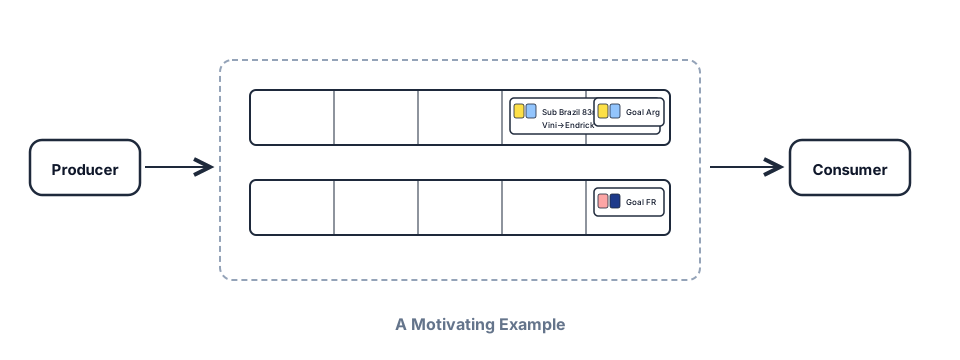
Now imagine the tournament expands to 1,000 teams, all playing at once. Events explode; a single queue host struggles. The consumer is drinking from a firehose and crashing. We add servers — but random distribution would scramble order: goals before kickoff, bookings for fouls not yet committed.
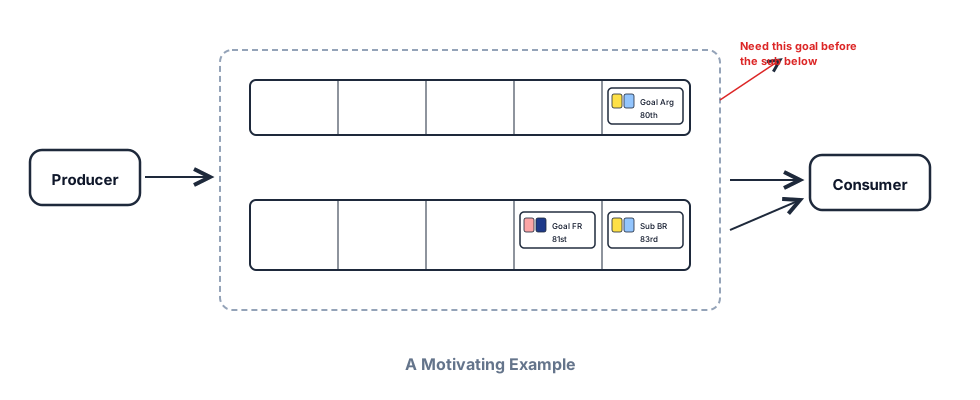
Partition by game ID. All events for one match share a partition and stay ordered. That's a core Kafka idea: messages route to partitions via a partitioning strategy — sensible defaults exist, but your key choice defines ordering guarantees.
The consumer is still overwhelmed. Add more consumers — but ensure each event is processed once. Consumer groups assign each partition to exactly one consumer in the group. Under normal operation, one delivery per consumer; on failure, at-least-once semantics may reprocess after restart.
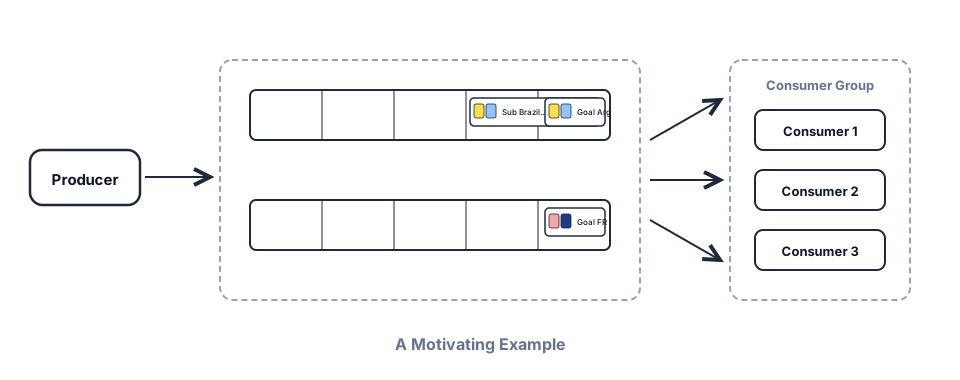
hash(gameId) % numPartitions — scale consumers up to partition count.We expand to basketball. Soccer stats shouldn't ingest basketball events. Introduce topics: each event belongs to a topic; consumers subscribe selectively. Soccer site → soccer topic; basketball site → basketball topic.
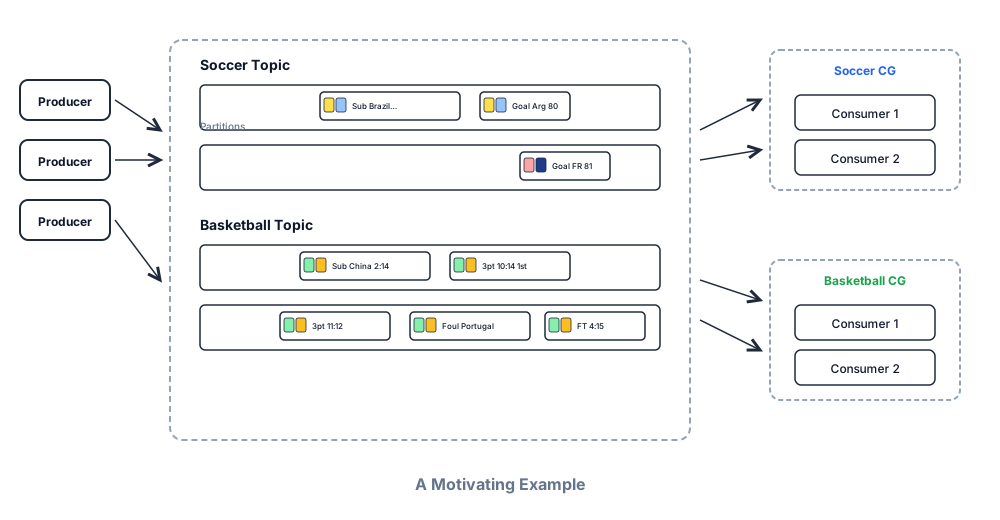
Terminology and architecture
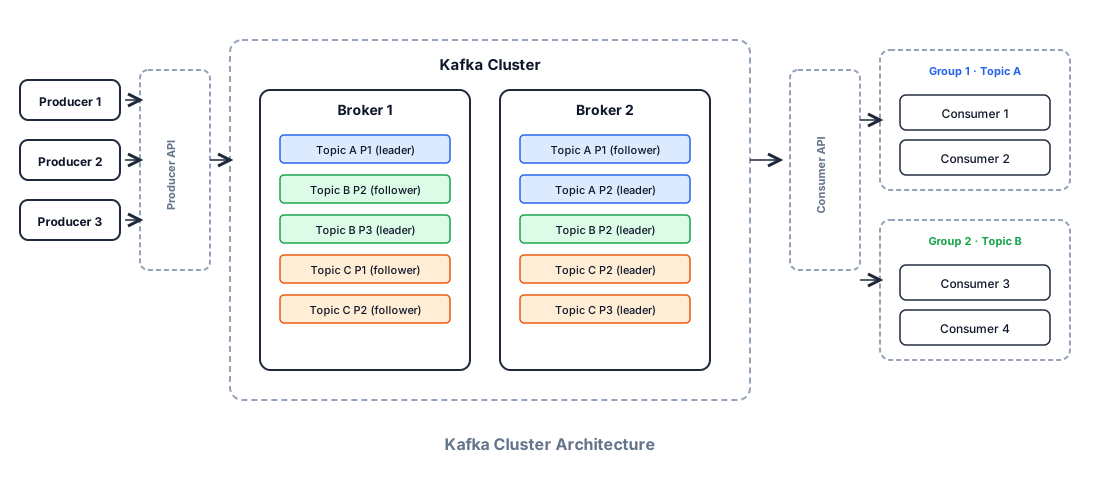
A Kafka cluster is multiple brokers — individual servers storing data and serving clients. More brokers → more capacity and fault tolerance.
- Partition — ordered, immutable, append-only sequence of messages (a log). Parallelism unit.
- Topic — logical grouping of partitions. Multi-producer; you publish and subscribe by topic.
- Producer / consumer — write and read. Kafka stores bytes; message format is yours.
- Topic vs partition — topic is logical organization; partition is physical placement and scale.
Queue vs stream: both use offset commits. As a queue, one consumer group processes each message for work. As a stream, the log is retained and replayable — multiple consumer groups read independently, continuously as data arrives. The distinction is consumption pattern, not a different product. See Message queues for delivery semantics that apply regardless of broker.
How it works
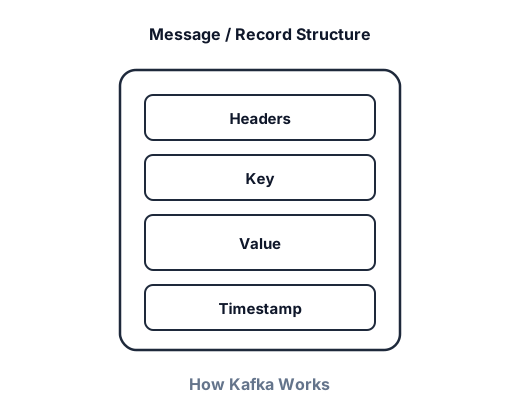
A producer sends a record to a topic: optional value, key, timestamp, and headers. The key determines the partition (hashed with murmur2 by default: partition = hash(key) % num_partitions). No key → sticky/default partitioner batches then rotates — fine for throughput, no ordering guarantee.
const kafka = new Kafka({ clientId: 'my-app', brokers: ['localhost:9092'] })
const producer = kafka.producer()

await producer.connect()
await producer.send({
  topic: 'my_topic',
  messages: [
    { key: 'game-42', value: 'goal scored' },
    { key: 'game-17', value: 'yellow card' },
  ],
})
Partition selection is two steps: (1) hash key → partition, (2) metadata maps partition → broker. The producer writes directly to the broker hosting that partition's leader.
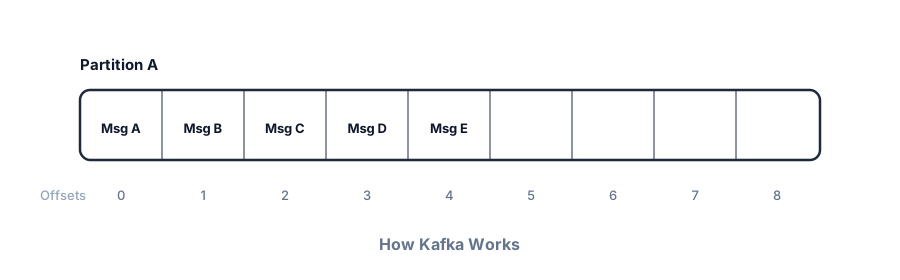
Each partition is an append-only log. Messages get sequential offsets; consumers track progress and commit offsets back to Kafka. Default delivery is at-least-once — crash after processing but before commit means reprocessing. Exactly-once needs idempotent producers plus transactional APIs.
Replication: each partition has one leader (handles writes and default reads) and follower replicas on other brokers — see the cluster diagram above for leader/follower placement. Followers replicate the log; if the leader fails, an in-sync follower promotes. The cluster controller manages leadership. acks=all waits for all in-sync replicas before acknowledging the producer.
Pull-based consumption: consumers poll brokers at their own pace — controls rate, simplifies backpressure, enables batching. Slow consumers aren't force-fed.
const consumer = kafka.consumer({ groupId: 'stats-updater' })

await consumer.connect()
await consumer.subscribe({ topic: 'match-events' })

await consumer.run({
  eachMessage: async ({ partition, message }) => {
    console.log(message.value?.toString(), partition)
  },
})When to use Kafka
As a message queue
- Async processing the user doesn't wait for — YouTube transcode after upload; pointer in Kafka, video in S3.
- Ordered processing — Ticketmaster virtual waiting room by arrival order (partition key = session or user).
- Decouple producer and consumer scale — producer bursts faster than downstream can drain.
As a stream
- Continuous real-time processing — ad click aggregation, live dashboards.
- Multiple independent consumers of the same data — FB Live comments fan-out to display, moderation, analytics (each its own consumer group).
- Replay and retention — new services catch up from the log without rewiring producers.
Kafka vs other queues and streams
Don't default to Kafka because it's famous. Name the shape first — one worker vs many independent readers, replay need, ops budget — then pick the broker. Full delivery semantics live in Message queues; this section is the brand-level comparison interviewers expect after you say "Kafka."

Quick comparison
| Option | Model | Replay / retention | Ops | Best when… |
|---|---|---|---|---|
| Kafka | Partitioned durable log; many consumer groups | Days–weeks (or tiered) | Cluster / MSK | Fan-out + replay + high throughput |
| Amazon SQS | Managed work queue (competing consumers) | Short (visibility timeout; no log replay) | Fully managed | One job, one worker; email, thumbnails |
| Amazon Kinesis Data Streams | Shard-based log (Kafka-like on AWS) | 1–365 days | Managed shards | AWS-native streaming; Kinesis Analytics / Firehose |
| RabbitMQ | AMQP broker; exchanges + queues | Until acked (not a long log) | Self-host or cloud | Flexible routing, priorities, classic task queues |
| ActiveMQ / Artemis | JMS queues + topics | Until consumed (store-and-forward) | Java enterprise ops | Existing JMS / Spring ecosystem |
| Redis Lists | LPUSH/BRPOP queue | Until popped | Redis you already run | Simple, low-volume jobs beside cache |
| Redis Pub/Sub | Fire-and-forget fan-out | None — offline = missed | Redis | Live notifications; cache invalidation |
| Redis Streams | Consumer groups on a stream ID log | Configurable (capped) | Redis | Lightweight Kafka-ish pattern; smaller scale |
Redis — three different tools in one box
Redis is often misnamed as "a queue." Be precise:
- Lists as a queue —
LPUSH+BRPOP(or reliable variants withRPOPLPUSH). Competing consumers, no multi-subscriber replay. Fine for small job queues when Redis is already in the stack. - Pub/Sub — publish to a channel; subscribers get it only if connected now. No persistence, no catch-up. Great for "user X's feed updated" live push or cache bust signals — not for orders.
- Streams — append-only entries with IDs, consumer groups, pending entries, ACK. Closest Redis analogue to Kafka. Prefer when you want log semantics without running brokers — but don't expect Kafka-scale retention or multi-datacenter throughput.
SQS (and SNS)
SQS is the default managed work queue on AWS: producers enqueue, workers compete, visibility timeout hides in-flight messages, DLQ after N receives. Standard = at-least-once, best-effort order. FIFO = per-group order + exactly-once processing within SQS's model (still design consumers carefully).
SNS is pub/sub fan-out to SQS queues, HTTP, email, etc. Pattern: SNS topic → multiple SQS queues (one per consumer team) when you want managed fan-out without Kafka ops.
- Choose SQS when — one logical consumer type, no multi-day replay, you want zero broker ops, volume fits SQS pricing.
- Choose Kafka instead when — many independent consumer groups, retention/replay, or very high sustained throughput where SQS cost/ops still lose.
Kinesis Data Streams
AWS's partitioned stream: shards ≈ Kafka partitions, retention up to a year, tight integration with Lambda, Firehose, Analytics. Capacity is shard-oriented (or on-demand mode). Same interview story as Kafka — key for order, scale shards for parallelism — with AWS billing and APIs instead of brokers.
- Choose Kinesis when — already deep in AWS, want managed shards + Lambda triggers, don't want to run MSK/Kafka.
- Choose Kafka/MSK when — need Kafka ecosystem (Connect, Flink, MirrorMaker), multi-cloud, or team already standardized on Kafka clients.
RabbitMQ
Mature AMQP broker: exchanges route to queues (direct, topic, fanout, headers). Competing consumers, acknowledgments, dead-letter exchanges, message priorities, flexible routing keys. Messages typically leave the broker once consumed — it's a smart router + buffer, not a long-lived commit log.
- Choose RabbitMQ when — complex routing (topic exchanges), priorities, RPC-over-queue patterns, classic microservices task queues.
- Choose Kafka when — event sourcing / CDC / analytics fan-out with retention and independent consumer groups.
ActiveMQ (Classic) / Artemis
JMS-oriented message brokers common in Java enterprise stacks: queues (point-to-point) and topics (pub/sub), persistent store-and-forward, XA/transactions with app servers. Artemis is the next-gen broker under the ActiveMQ umbrella.
- Choose ActiveMQ/Artemis when — org already runs JMS, Spring JMS, or needs Java EE-style messaging with existing ops playbooks.
- Prefer Kafka/Rabbit/SQS for greenfield — unless JMS compatibility is a hard requirement.
Decision cheat sheet (say this)
- Single worker job, managed AWS → SQS (+ DLQ). Optional SNS for fan-out to several SQS queues.
- Live UI / cache bust, miss OK if offline → Redis Pub/Sub (or SSE/WebSocket tier — see Real-time updates).
- Small durable jobs on existing Redis → Lists or Redis Streams.
- Flexible routing, priorities, AMQP → RabbitMQ.
- Java/JMS estate → ActiveMQ / Artemis.
- AWS stream + Lambda/Firehose → Kinesis.
- Many readers, replay, high throughput, CDC/events → Kafka (or MSK / Confluent).
What to know for interviews
Depth scales with level. Juniors: producer, topic, consumer group, partition key for order. Seniors: hot partitions, offset commit timing, acks/replication. Staff: retention vs cost, exactly-once trade-offs, when managed MSK/Confluent hides ops you still need to reason about.
Scalability
One broker on good hardware: rough ballpark ~1TB storage and up to ~1M msgs/sec (message size and hardware dependent). Below that, scaling may not be the interesting conversation.
To scale: add brokers and enough partitions to use them — under-partitioned topics won't spread load. Managed Kafka (Confluent Cloud, AWS MSK) automates much of this; interviews still want your partition strategy.
Partitioning strategy
The main design decision: choose keys that spread load and preserve needed order. Bad key → hot partitions (Nike LeBron ad overwhelming one partition). Mitigations:

- No key — even spread, lose ordering (sticky partitioner over time).
- Random salting — append random suffix to key; redistributes load, complicates downstream aggregation.
- Compound key — ad ID + region or user segment when attributes vary independently.
- Backpressure — slow the producer when partition lag spikes.
Fault tolerance and durability
Durability = replication + producer acks. Replication factor 3 (1 leader + 2 followers) survives a broker loss with ISR intact.
Kafka is often described as always available, sometimes consistent. "What if Kafka goes down?" is usually the wrong question — clusters are designed for continuity. Consumer failure is the realistic scenario:
- Offset commits — consumer records progress; restart resumes from last commit. Crash before commit → reprocess (at-least-once).
- Rebalancing — failed consumer's partitions redistribute to survivors in the group.
- Commit timing — in a web crawler, don't commit until raw HTML is in blob storage; smaller consumer work units mean less redo on failure.
Retries and errors
Producer retries — network blips and broker failovers; enable idempotent: true so retries don't duplicate.
const producer = kafka.producer({
  retry: { retries: 5, initialRetryTime: 100 },
  idempotent: true,
})
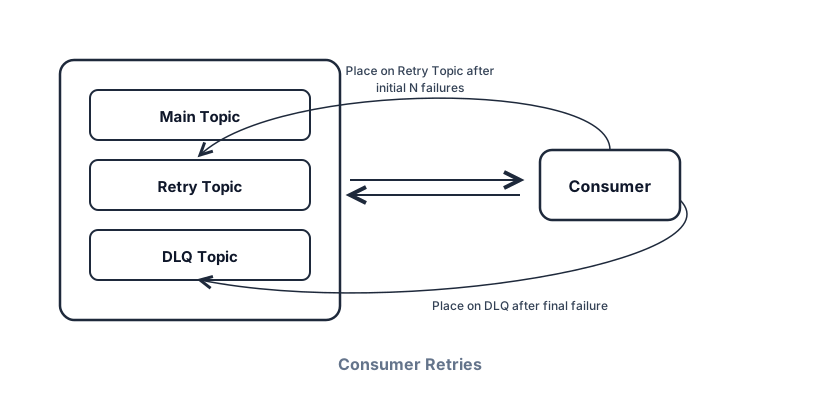
Consumer retries — Kafka has no built-in consumer retry (SQS does). Common pattern: failed messages → dedicated retry topic → separate consumer; after N attempts → dead letter queue (DLQ) for investigation.
Cost and performance levers
Kafka design sketch

Sizing sketch
Partitions ≥ max parallel consumers in a group. Too many partitions → metadata/memory overhead. Replication factor 3 in prod. Disk = produce_rate × retention × RF. Call these out when drawing Kafka.
Failure modes to mention
Call out at least one dependency failure (DB down, cache stampede, queue lag, region outage) and your mitigation (timeouts, retries with jitter, degraded mode, circuit breaker).
Interview Q&A by level
Practice saying these out loud for Kafka — and redraw the sketch from memory after each answer. Interviewers grade clarity and judgment more than buzzwords.


Match depth to the bar: define → trade off → operate. Don't dump principal answers in an entry-level screen. Close the laptop and redraw each sketch once.
Wrapping up
When you propose Kafka, also name your levers: partition count for parallelism, producer batching/compression for throughput, RF + acks for durability vs cost, and retention (or tiered/S3 archive) so hot disk doesn't grow forever.
Kafka is a distributed commit log: producers append to partitioned topics; consumer groups read in parallel with partition-level ordering; replication and acks trade latency for durability. Lead with partition strategy and hot-partition mitigations; mention at-least-once and idempotent consumers; don't put multi-megabyte payloads on the bus. When the prompt is a simple work queue, say SQS/Rabbit/Redis Streams first — save Kafka for fan-out and replay.
For queue semantics, delivery guarantees, and poison-message patterns that apply across brokers, start with Message queues. Broker pick matrix: see Kafka vs other queues and streams. For absorbing write bursts before the database, see Scaling writes. For event-driven saga choreography, see Multi-step processes. When you need stateful stream aggregation on top of Kafka, see Apache Flink; for nightly batch analytics, see Apache Spark. For how Kafka historically used ZooKeeper (and KRaft today), see the coordination deep dive. For where Kafka sits among Postgres, Redis, and SQS, see Key technologies.
Using this for live fan-out? See Real-time updates for protocol choice and the two-hop model.
How to answer this in a backend interview
Durable partitioned append-only stream
Partition key = order + locality
Groups share partitions; scale = partitions
At-least-once; idempotent produce / EOS when earned
Simple job queue → SQS/Rabbit first
Kafka is my pick when many consumers need the same event history — analytics, search indexers, fan-out — with retention and replay. I'd choose a partition key that preserves the ordering we care about (user_id, order_id) without creating a hot partition. Consumer groups scale by partition count. Producers use idempotent writes when duplicates hurt; consumers stay idempotent either way. I wouldn't use Kafka as a fancy RPC or as a database.
Related Lattice posts: Message queues · Real-time updates · Scaling writes · Design news feed