Understanding the problem
Dropbox is a cloud-based file storage service: users store and share files, and access them from any device. Designing the product is different from designing Blob Storage itself — blob design is related research, but out of scope for this question.
Presigned PUT to S3.
CDN signed URL.
ACL + short-lived link.
Push + poll safety net.
Pair with Delivery framework, Handling large blobs, Caching, Realtime updates, and CAP theorem.
Functional requirements
Pin what users must be able to do before drawing boxes. Top 3–4 features — don't drown in editing or preview.
Non-functional requirements
Core entities
Start broad — columns come later. Align with the interviewer on these three:
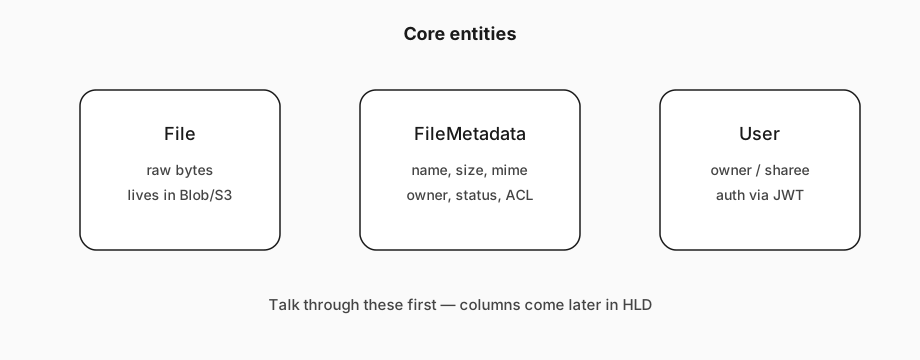
- File — raw bytes users upload/download/share.
- FileMetadata — name, size, mime type, uploader, status, later chunks/fingerprint.
- User — who owns or was shared a file.
API / system interface
Define one endpoint per functional requirement. Expect the upload/download APIs to evolve once you introduce presigned URLs — say that out loud.
POST /files
{ File, FileMetadata }

GET /files/{fileId} -> File & FileMetadata

POST /files/{fileId}/share
{ User[] }  // share with these users

GET /files/changes?since={timestamp} -> ChangeEvent[]
// ChangeEvent: fileId, type (created|updated|deleted), metadataHLD — upload a file
Two questions: where do bytes live, and where does metadata live?
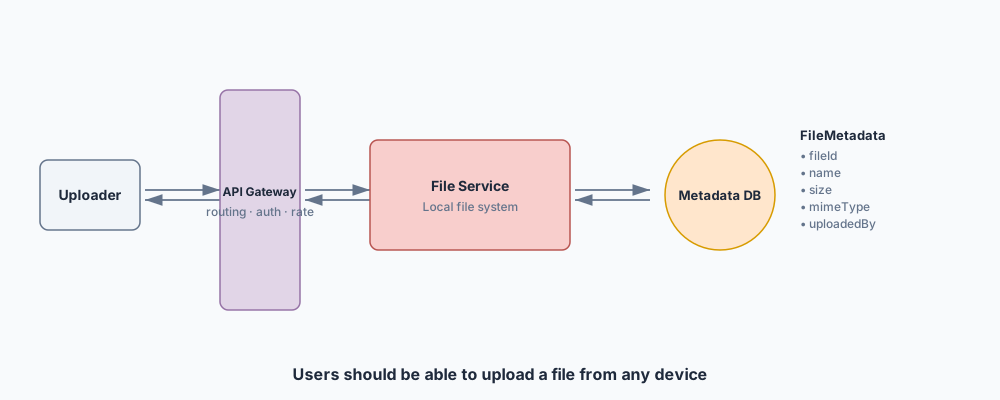
Metadata fits a document store (DynamoDB) or Postgres — few relations, query by user. Don't burn the interview on DB brand wars; either is fine. Schema sketch:
{
  "id": "123",
  "name": "file.txt",
  "size": 1000,
  "mimeType": "text/plain",
  "uploadedBy": "user1",
  "status": "uploading"
}
Approach 1 — store on the app server
Approach 2 — Blob Storage via the backend
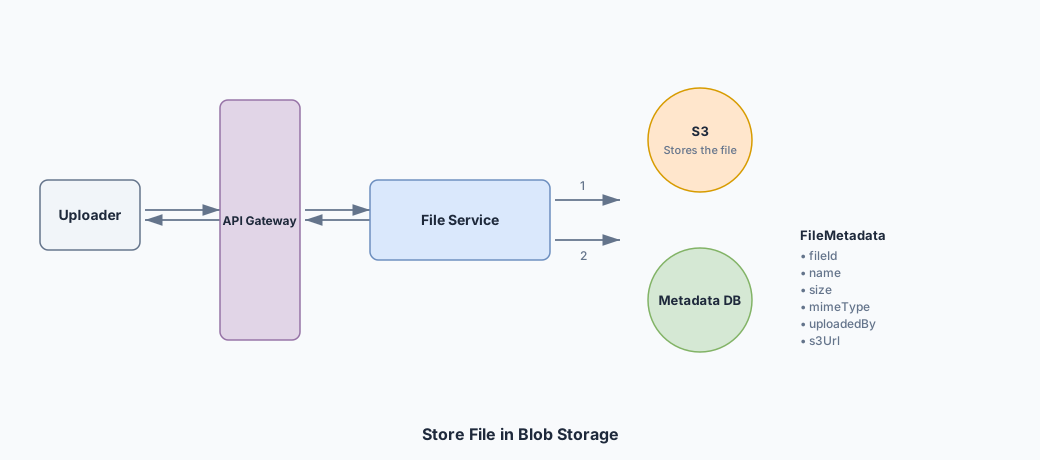
Handle partial failures carefully: only mark metadata complete when the blob is stored (or compensate). Still suboptimal bandwidth/cost.
Approach 3 — direct upload with presigned URLs (best)
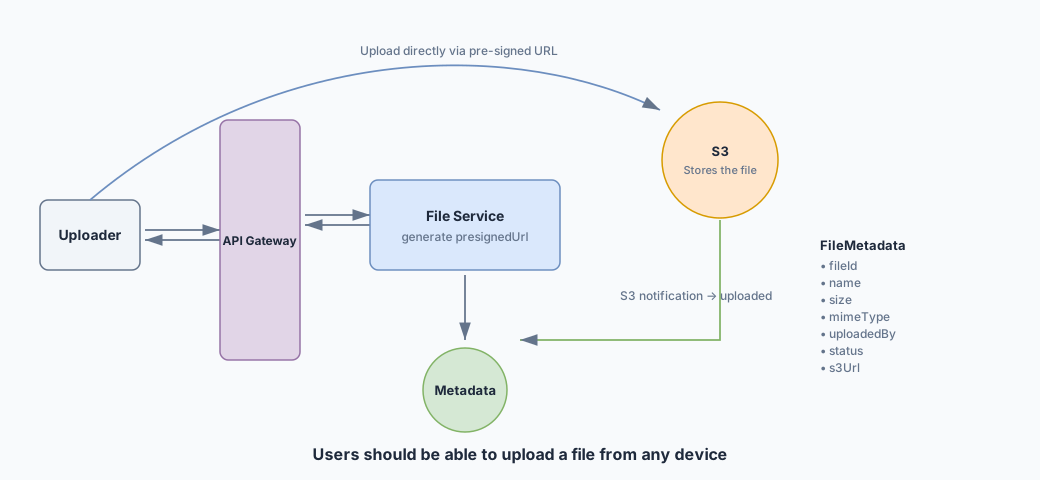
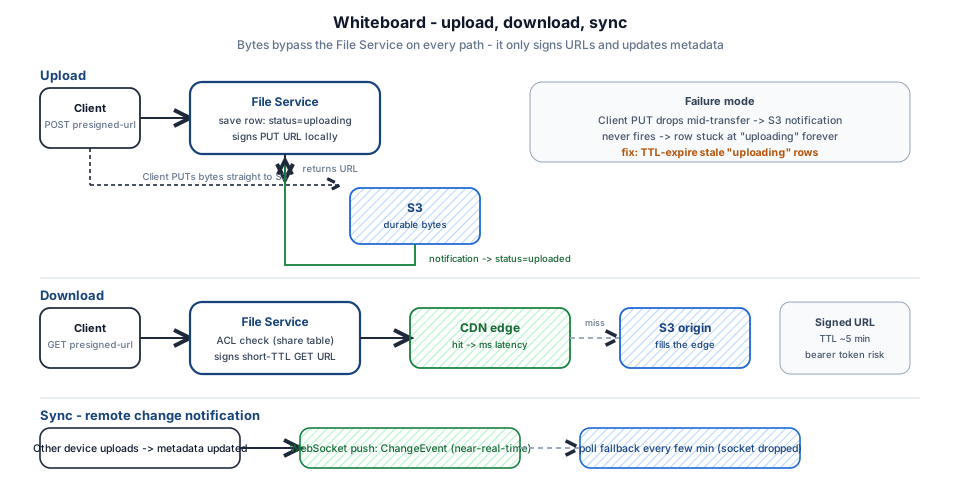
POST /files/presigned-urlwith FileMetadata → backend saves row withstatus: uploading, returns presigned PUT URL (signed locally with AWS creds — no S3 round-trip to generate).- Client
PUTs bytes straight to S3. - S3 notification → backend sets
status: uploaded.
HLD — download a file
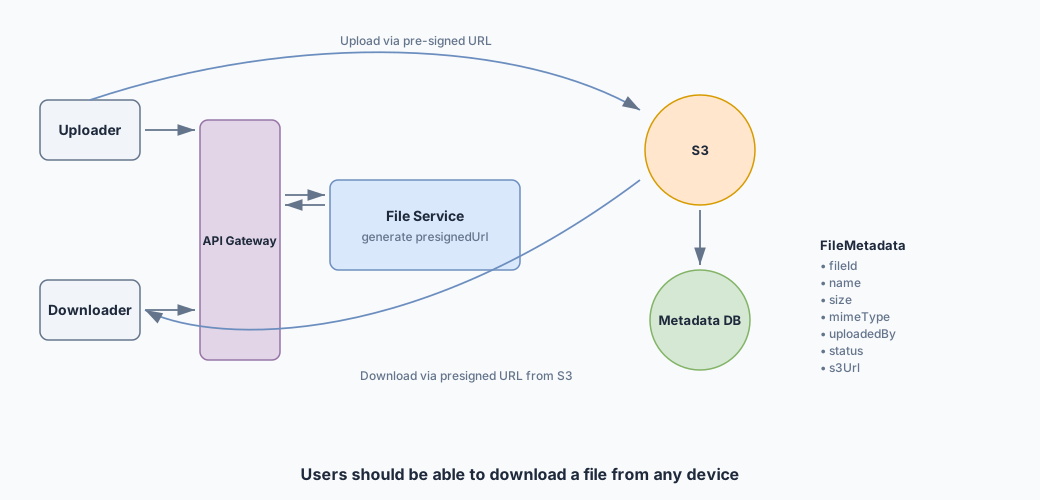
Same anti-pattern as upload: proxying bytes through the File Service downloads twice. Prefer direct access.
GET /files/{fileId}/presigned-url— ACL check, then return a short-lived download URL.- Client fetches bytes from Blob Storage (or CDN) directly.
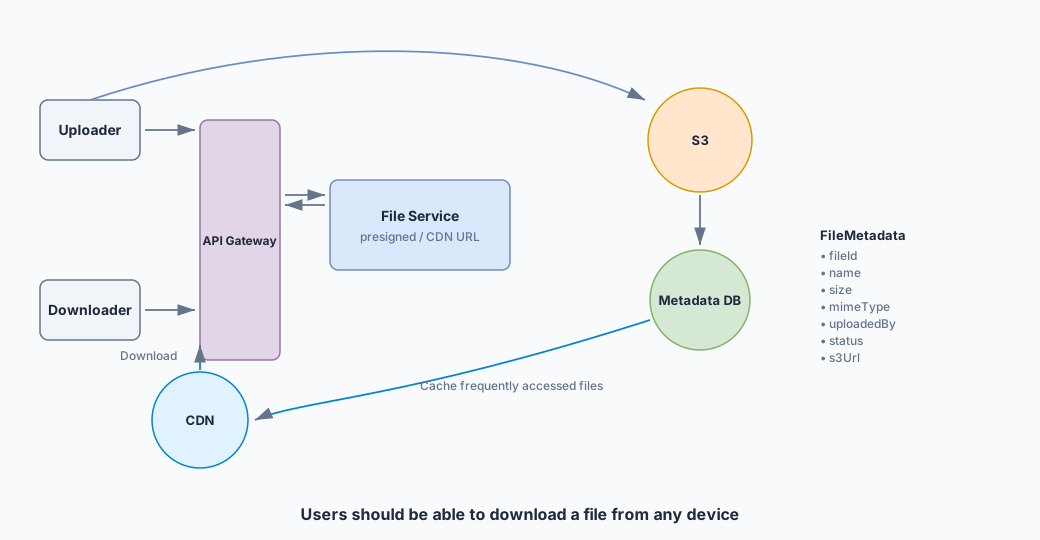
Add a CDN for geo latency
Single-region S3 is slow for far users. Put a CDN (CloudFront) in front: first request may miss to S3; later hits serve from the nearest edge.
HLD — share a file
Google Drive–style: share by email/userId (assume users already exist). Keep it fast — ACL writes are small metadata ops.
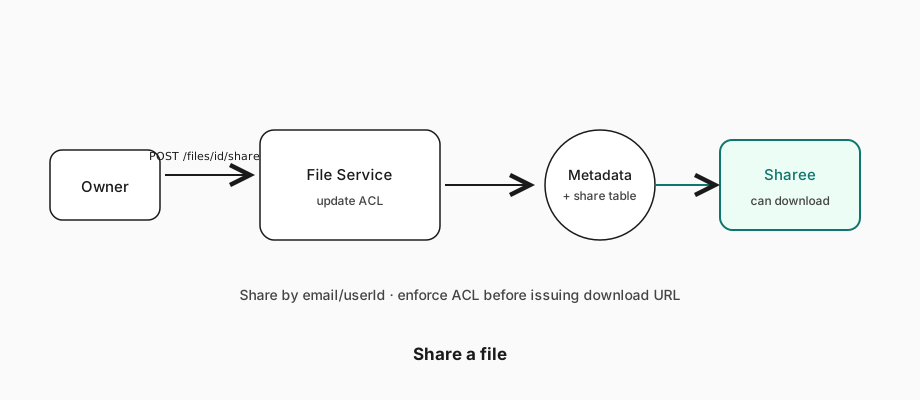
- Store shares in the metadata DB (embedded list or separate share table).
- Before issuing any download URL, verify requester is owner or sharee.
- Optionally notify the sharee (email / push) — nice-to-have in interview.
HLD — sync across devices
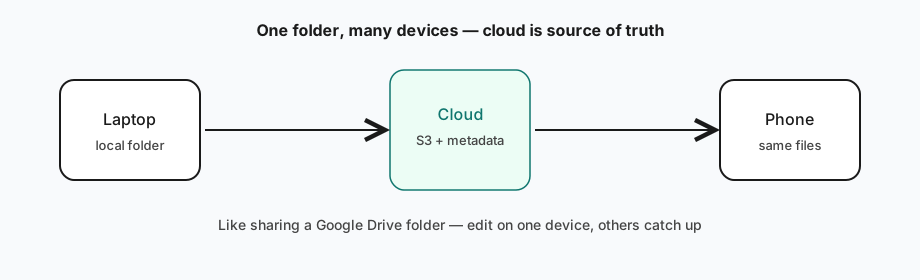
Each device keeps a local copy; remote storage is source of truth. Two directions: local → remote and remote → local.
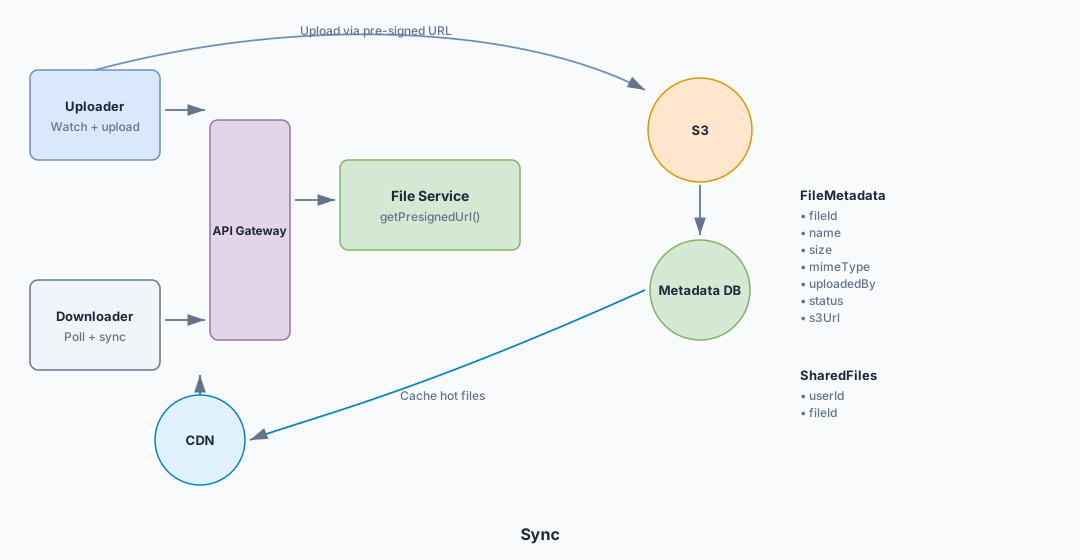
Local → remote
A sync agent watches the Dropbox folder (FSEvents / FileSystemWatcher), queues changes, uploads via the upload API, updates metadata. Conflicts: last write wins for this design. Versioning is below the line — in production you'd keep versions/chunks instead of overwriting the only object.
Remote → local
- Polling — simple, wasteful if quiet, slow to detect.
- WebSocket / SSE — one connection per device/session; server pushes ChangeEvents.
- Hybrid (recommended) — push for near-real-time + poll every few minutes so dropped sockets don't lose updates.
Tying it together — final design
At this point all functional requirements have a path. Here's the whole system:
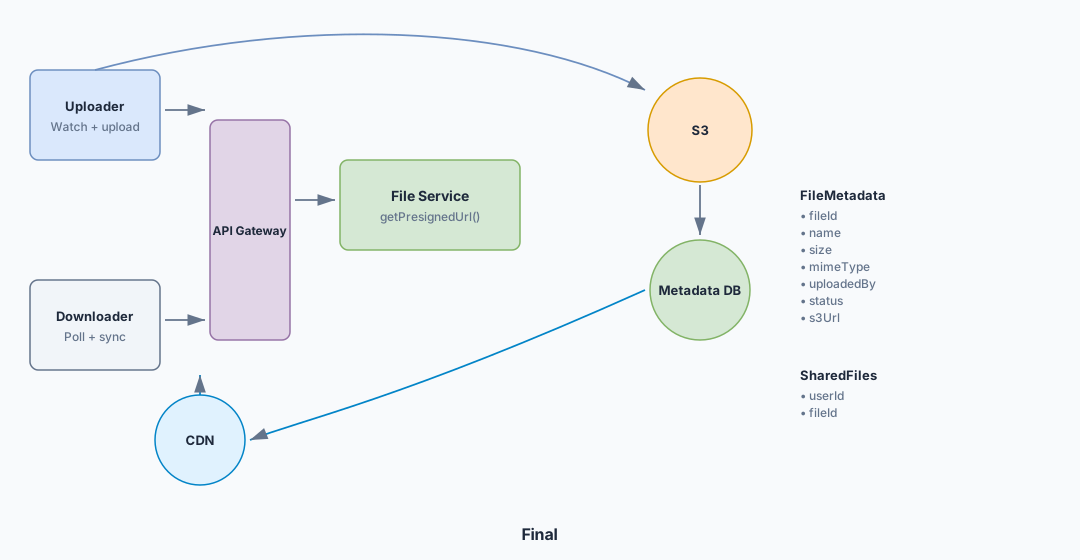
- Uploader / Downloader — same client app, drawn separately for clarity; also runs the sync agent.
- LB & API Gateway — SSL, rate limits, routing.
- File Service — metadata R/W + cryptographic signing of URLs (local op with AWS keys).
- Metadata DB — files + share mappings for ACL.
- S3 — durable blob store.
- CDN — edge cache for downloads.
Deep dive — support large files (50GB)
UX goals: progress and resumable uploads. A single 50GB POST fails timeouts, payload limits (API Gateway ~10MB), and network drops — and leaves the user staring at a spinner.
Chunk on the client (5–10MB typical) — never "chunk on the server" after uploading the whole file once. That defeats the purpose.
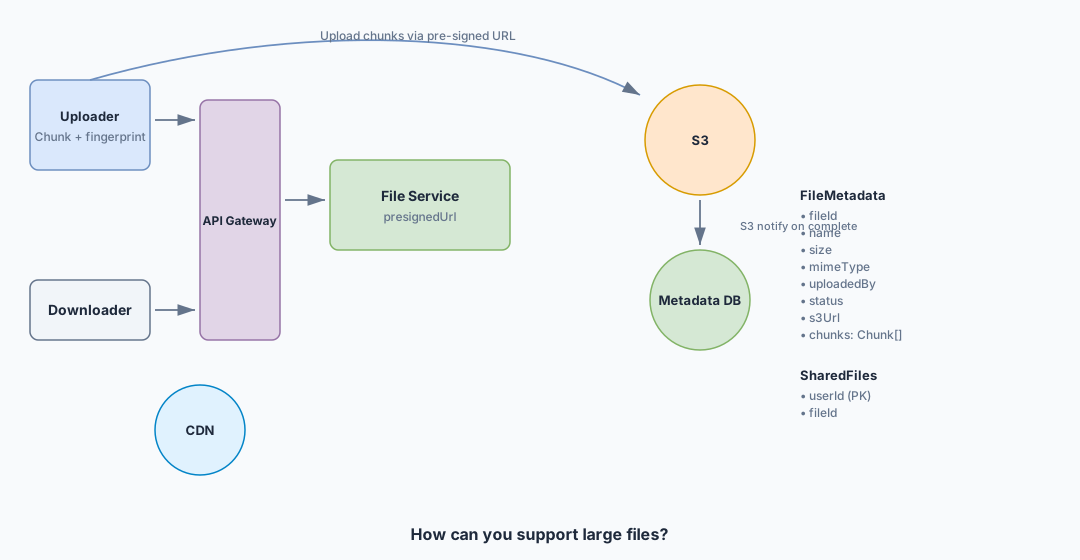
{
  "id": "123",
  "name": "big.bin",
  "status": "uploading",
  "fingerprint": "sha256:…",
  "chunks": [
    { "id": "1", "status": "uploaded" },
    { "id": "2", "status": "uploading" },
    { "id": "3", "status": "not-uploaded" }
  ]
}- Client fingerprints whole file + each chunk (SHA-256) — resume/dedup by content, not filename.
- If same fingerprint exists with
uploading, resume missing chunks. - Else: backend
CreateMultipartUpload, store metadata, returnuploadId+ per-part presigned URLs. - Client uploads parts; after each,
PATCHstatus + ETag; backend can verify viaListParts. - When all chunks uploaded →
CompleteMultipartUpload→ mark fileuploaded.
Downloads don't need the original chunk map: after complete, it's one object. Use HTTP Range for parallel/resumable downloads.
Deep dive — make upload, download, and sync fast
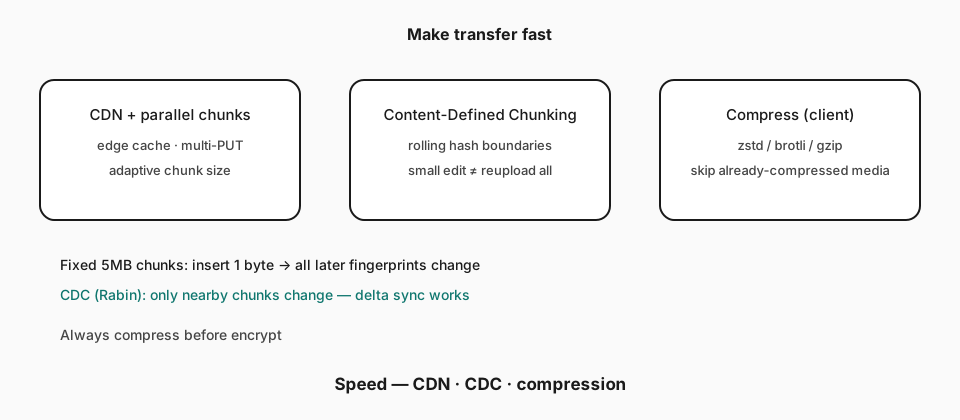
- CDN — downloads from nearest edge.
- Parallel chunk uploads — fill the pipe; adapt chunk size to network.
- Delta sync — only changed chunks. Fixed-size chunks break on mid-file inserts (every later fingerprint shifts). Use Content-Defined Chunking (CDC) with a rolling hash (Rabin) so small edits only touch nearby chunks — how Dropbox-like systems actually sync.
- Compression on the client before upload (zstd / brotli / gzip). Skip already-compressed media. Compress before encrypt — ciphertext doesn't compress.
Deep dive — file security
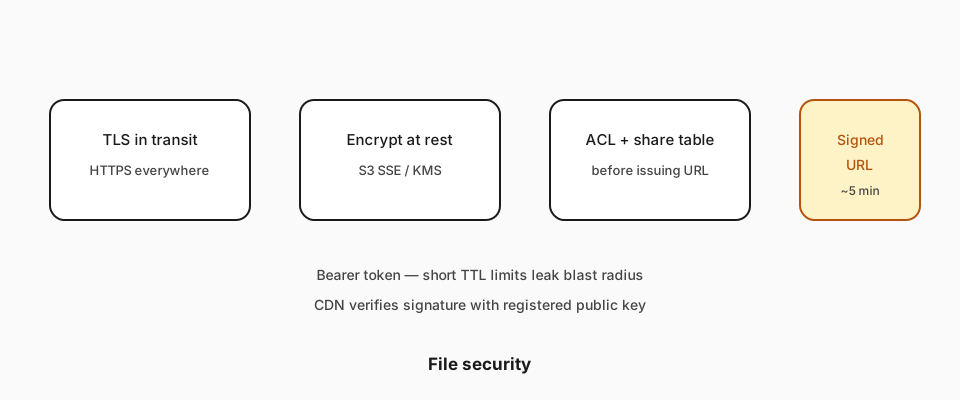
- Encryption in transit — HTTPS.
- Encryption at rest — S3 SSE / KMS.
- Access control — share table checked before minting download URLs.
- Signed URLs — short TTL (e.g. 5 min). Anyone with the URL can download until expiry — TTL limits leak blast radius; stricter options: IP binding or cookie+URL combo.
- CDN (CloudFront) validates signature with registered public key + expiry before serving.
Cost and performance levers
What interviewers expect by level
Dropbox is a classic "product design" system question — bar rises with how much of the deep dive you own unprompted.
Architecture by level
Three progressive sketches — beginner spine, mid optimizations, pro production depth. Use the matching diagram in the interview; say the tradeoff out loud.
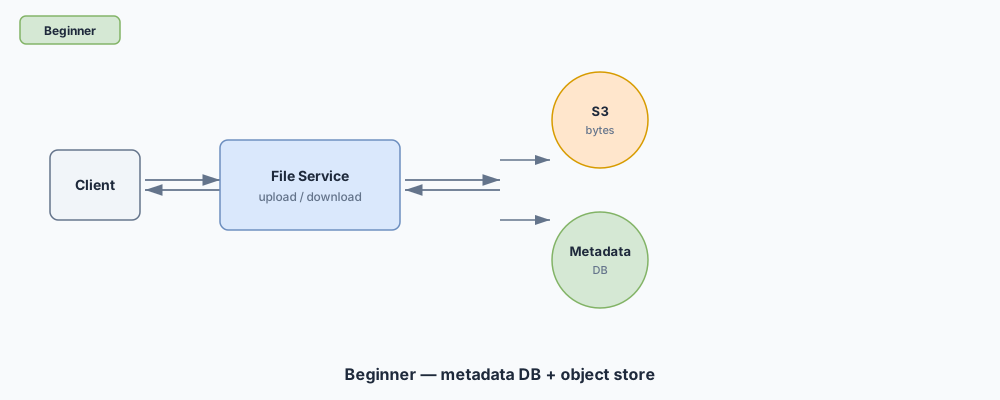
Pros: Clear split of bytes (object store) vs metadata (DB) — the core insight interviewers want first. Cons: Piping every byte through app servers won't scale; no CDN or chunking means large-file uploads time out in the real world.
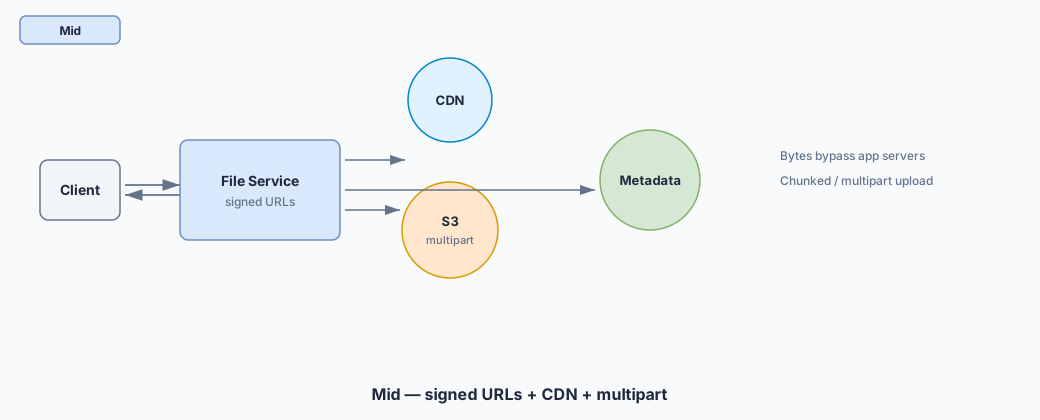
Pros: Signed URLs keep bandwidth off your fleet; CDN speeds downloads; multipart handles GB files. Cons: Signed URL expiry / ACL bugs become a security surface; multipart state machines add failure modes you must name (orphan parts, resume).
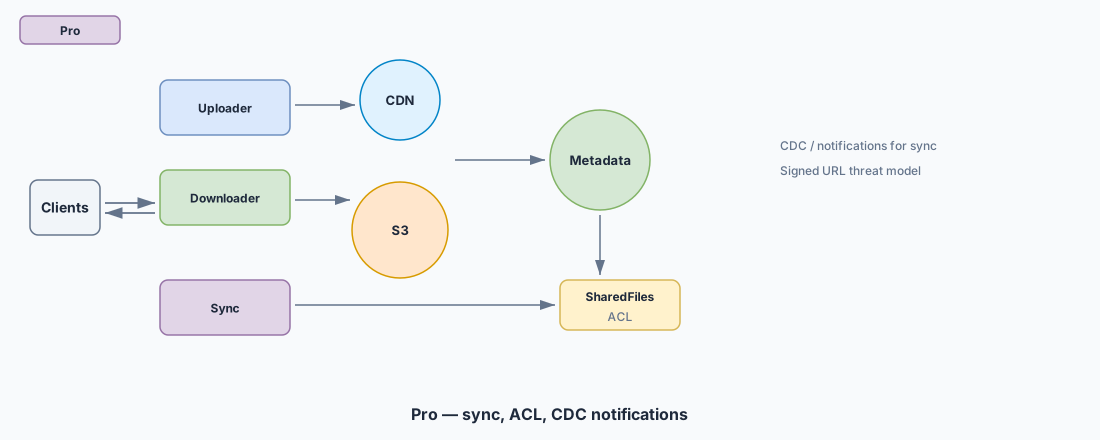
Pros: Sync + CDC/notifications and SharedFiles ACL match real Dropbox product depth; threat model for signed URLs shows staff judgment. Cons: Sync reliability and conflict resolution can eat the whole interview — pick 1–2 deep dives or you never finish the spine.
Mid: solid spine + coachable on blobs. Senior: own large-file deep dive. Staff+: anticipate failures and name trade-offs like you've shipped them.
Wrapping up
Dropbox teaches separating control plane from data plane: metadata + signed URLs on your servers, durable bytes on blob storage, CDN for reads, multipart for 50GB, and hybrid push/poll for sync — with AP-friendly lag between regions.
Related: Delivery framework · Handling large blobs · Design Yelp · Design Instagram · Long-running tasks · Caching · Realtime updates · CAP · Common patterns.
Backend depth — interview talking points
Related Lattice posts: Large blobs · Data modeling · Message queues · Caching strategies