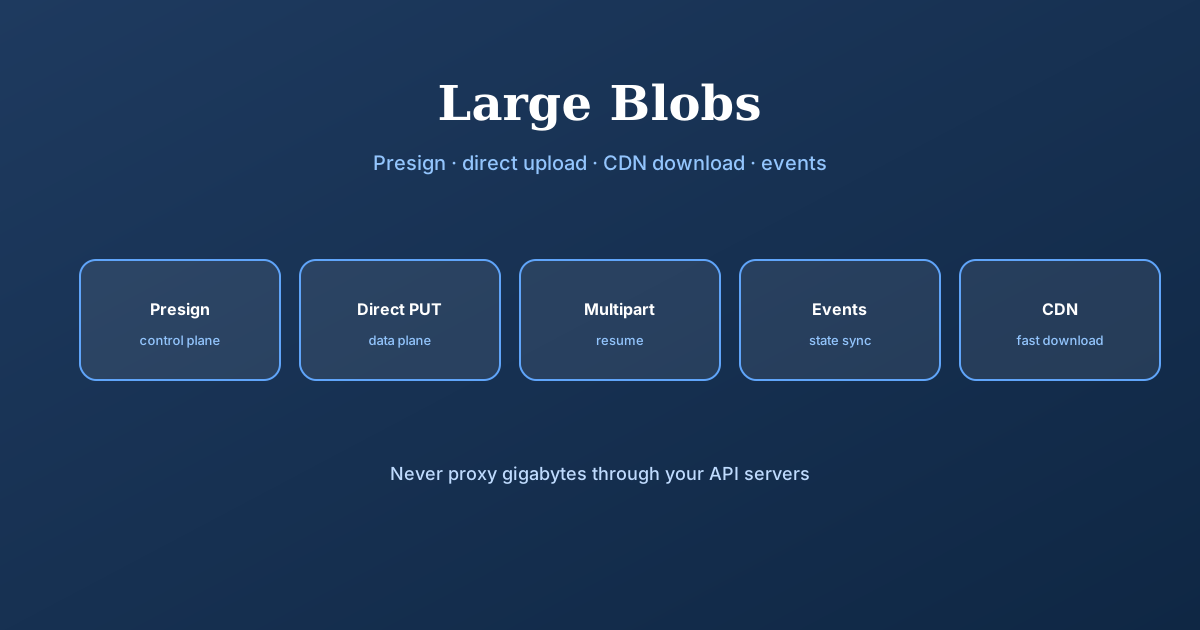
Why large files need their own pattern
Large files — videos, images, documents — need special handling. Instead of shoving gigabytes through your servers, use presigned URLs so clients upload directly to blob storage and download from CDNs. You get resumable uploads, parallel transfers, and progress tracking — the stuff that separates real systems from toy projects.
This is the deep dive behind Common patterns. Pair with Managing long-running tasks (transcode after upload), Real-time updates (progress %), and Networking essentials (HTTP range requests).
Scoped temp credentials.
Client ↔ storage.
Multipart chunks.
Events + reconciliation.
The problem
If you've studied for system design interviews, you know large files belong in blob storage like S3, not databases. Databases excel at structured data with complex queries but are terrible with large binary objects. A 100MB BLOB kills query performance, backup times, and replication. Object stores are built for this: unlimited capacity, 11-nines durability, per-object pricing. Rule of thumb: over 10MB and no SQL queries needed → blob storage.
Blob storage solved storage but not transfer. The naive approach routes bytes through application servers: client uploads 2GB video → API receives → forwards to S3. Downloads reverse the path. Works for small files; breaks as files grow.
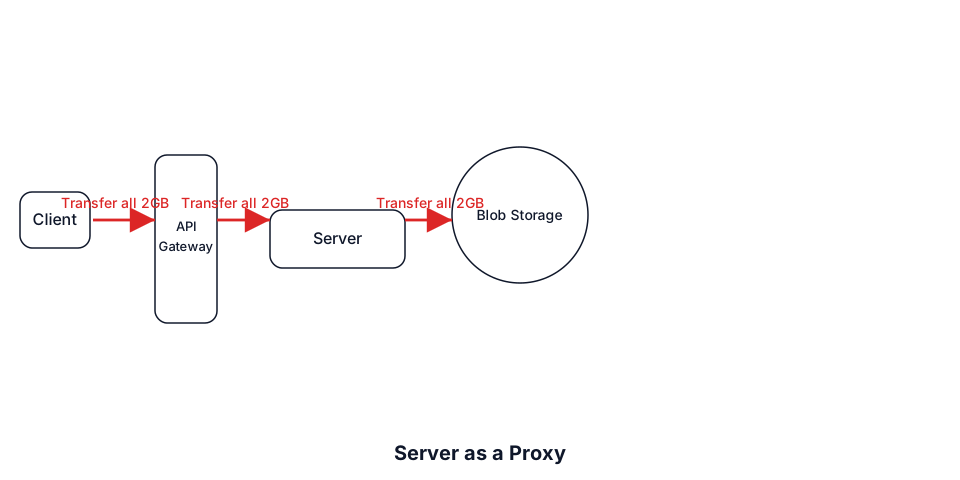
We're forcing servers to be dumb pipes — they add no value, just latency and cost. Cloud providers already have global infrastructure, resume capability, and massive bandwidth. Yet we insert limited app servers as middlemen.
Serverless data access
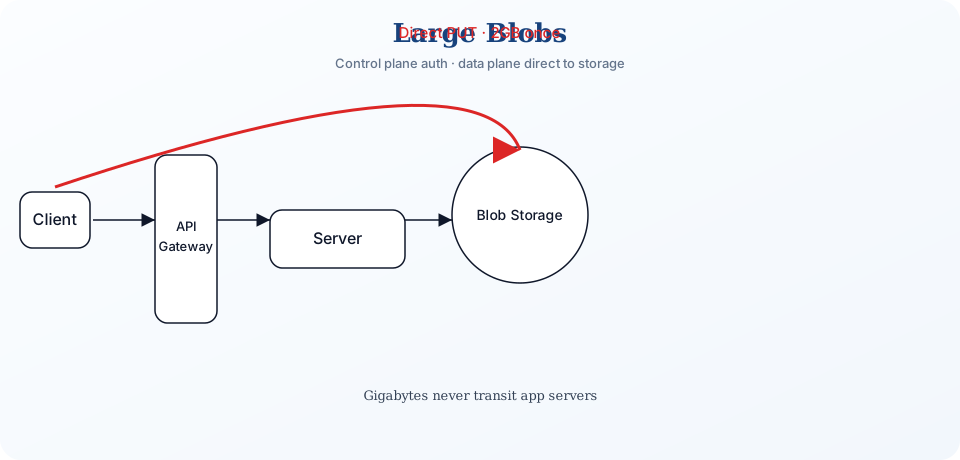
Instead of proxying data, give clients temporary scoped credentials. Your server's role shifts from data transfer to access control — validate the request, generate credentials, get out of the way.
AWS S3, Google Cloud Storage, and Azure Blob Storage all support temporary URLs with time-limited upload or download permissions. CDNs validate signed tokens before serving content too.
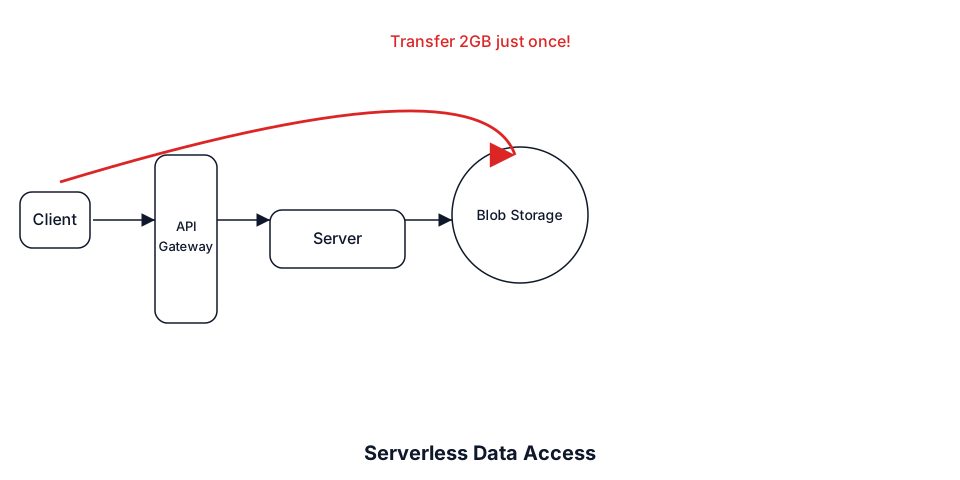
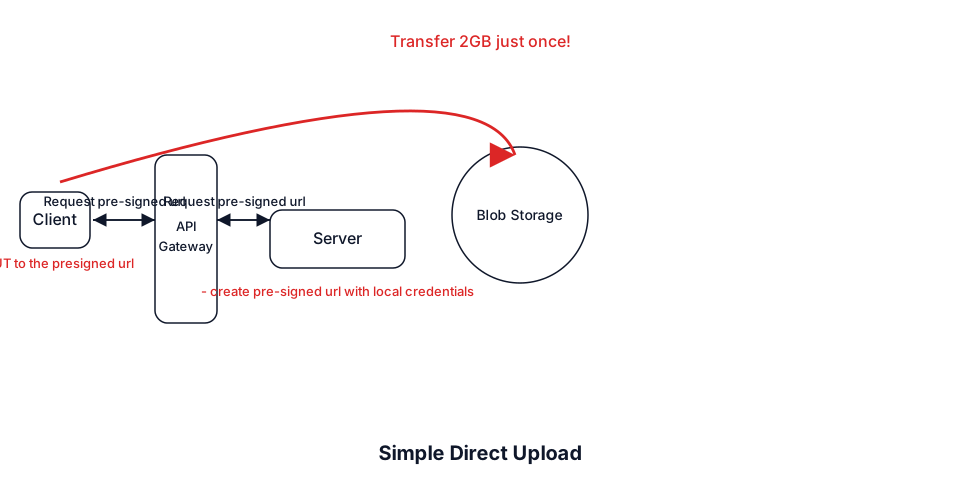
Simple direct upload
When a client wants to upload, your server receives a permission request — not the file. Validate the user, check quotas, generate a temporary upload URL. The URL encodes permission to upload one specific object to one location for a limited time (typically 15 minutes to 1 hour). This is a presigned URL.
Generating a presigned URL happens in your application's memory — no network call to storage. Your server uses cloud credentials to create a signature the storage service verifies later:
https://mybucket.s3.amazonaws.com/uploads/user123/video.mp4
?X-Amz-Algorithm=AWS4-HMAC-SHA256
&X-Amz-Credential=AKIAIOSFODNN7EXAMPLE%2F20240115%2Fus-east-1%2Fs3%2Faws4_request
&X-Amz-Date=20240115T000000Z
&X-Amz-Expires=900
&X-Amz-SignedHeaders=host
&X-Amz-Signature=b2754f5b1c9d7c4b8d4f6e9a1b2c3d4e5f6...
The signature is a cryptographic hash of request details (HTTP method, path, expiry) plus your secret key. Storage recalculates the hash — if it matches and hasn't expired, upload proceeds.
Encode restrictions when generating URLs — baked into the signature:
- content-length-range — min/max sizes (prevent 10GB on a 10MB URL)
- content-type — profile picture endpoint accepts images only
The client performs a simple HTTP PUT to the URL. From their perspective they're uploading directly to storage. Your infrastructure never touches the bytes. A Sydney user uploads to Sydney's region at full speed while your Virginia servers handle other requests.
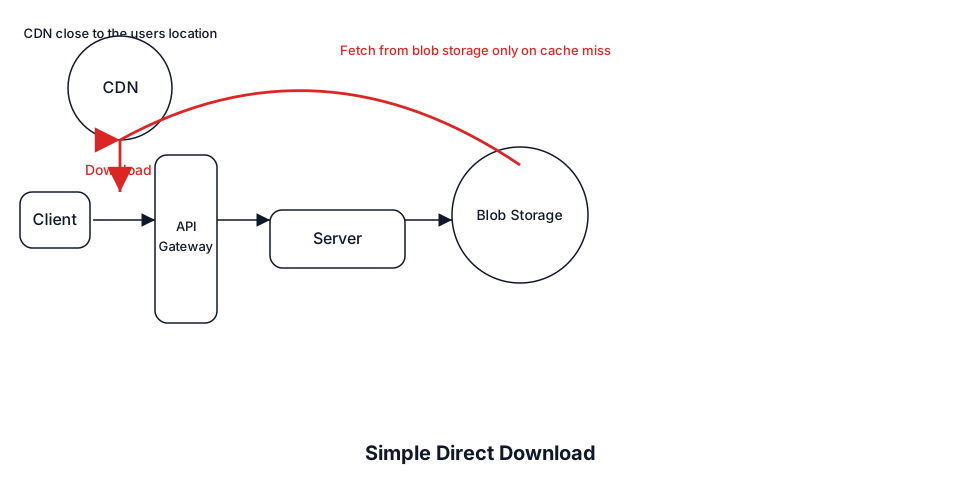
Simple direct download
Downloads work the same way — from blob storage directly or through a CDN. Generate signed URLs granting temporary read access. Direct blob access is simpler and cheaper for infrequent downloads. CDN distribution costs more but gives better performance for hot content via geographic caching.
For CDN delivery you're not signing S3 URLs — you create CloudFront signed URLs or signed cookies the CDN validates:
https://d123456.cloudfront.net/videos/lecture.mp4
?Expires=1705305600
&Signature=j1k2l3m4n5o6...
&Key-Pair-Id=APKAIOSFODNN7EXAMPLE
Both use signatures, but validation differs:
- Blob storage (S3 presigned) — validated by storage using your cloud credentials (shared secret).
- CDN (CloudFront signed) — validated at edge using public/private key crypto. CDN holds the public key; you sign with the private key. No callback to origin needed.
Resumable uploads
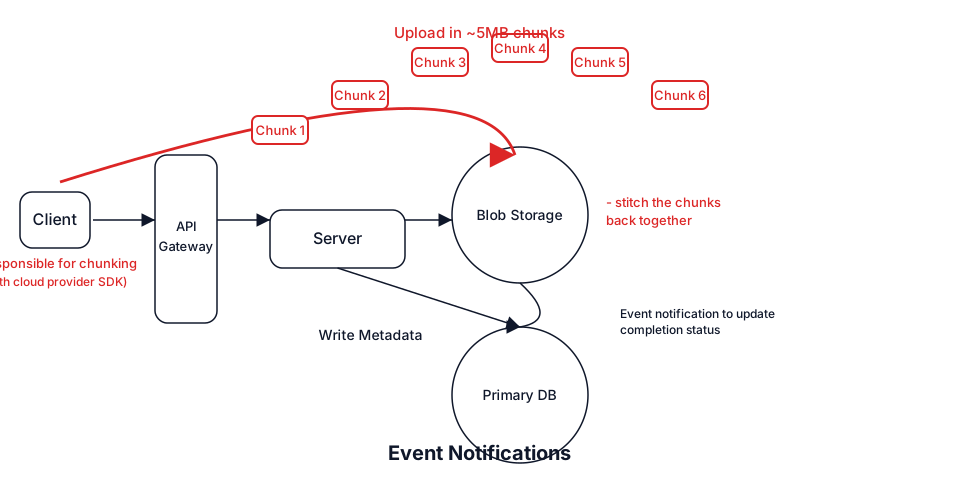
A 5GB video at 100 Mbps takes ~7 minutes. Connection drop at 99% with a simple PUT means starting over. All major clouds solve this with chunked upload APIs.
- AWS S3 — multipart upload, 5MB–5GB parts, each with its own presigned URL
- Google Cloud — resumable upload session URL + range headers
- Azure — block blobs, 4MB–100MB blocks
Client uploads parts, tracking checksums. Connection drops after 60 of 100 parts? Query which parts succeeded (ListParts in S3), resume from part 61. Storage maintains state via upload ID / session URL.
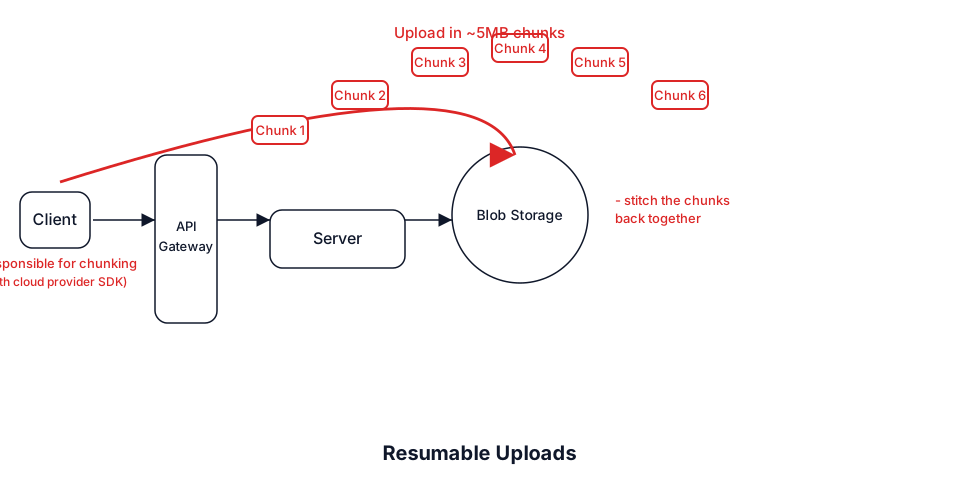
Progress tracking comes naturally — percentage = completed parts / total. After all parts upload, call the completion endpoint with part numbers and checksums. Until completion succeeds, parts exist but no accessible file. Incomplete multipart uploads cost money — lifecycle rules should clean them up after 24–48 hours.
State synchronization
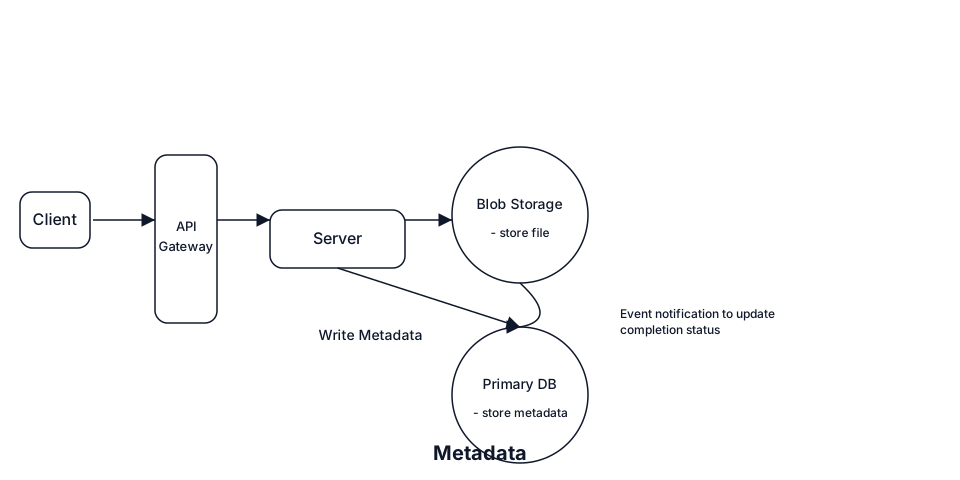
Moving servers out of the critical path solves the bottleneck but introduces distributed state management. Store metadata in your database; actual file lives in blob storage.
CREATE TABLE files (
    id              UUID PRIMARY KEY,
    user_id         UUID NOT NULL,
    filename        VARCHAR(255),
    size_bytes      BIGINT,
    content_type    VARCHAR(100),
    storage_key     VARCHAR(500),  -- s3://bucket/user123/files/abc.pdf
    status          VARCHAR(50),   -- pending, uploading, completed, failed
    created_at      TIMESTAMP,
    updated_at      TIMESTAMP
);
With direct uploads, keeping status in sync is tricky. The naive approach: client calls "upload complete!" after PUT. Problems:
- Race conditions — DB shows completed before file exists
- Orphaned files — client crashes after upload, before notify
- Malicious clients — mark complete without uploading
- Network failures — completion notification never arrives
Most blob storage services solve this with event notifications. When S3 receives a file, it publishes via SNS/SQS/Lambda with the object key — the same storage_key you stored when generating the presigned URL.
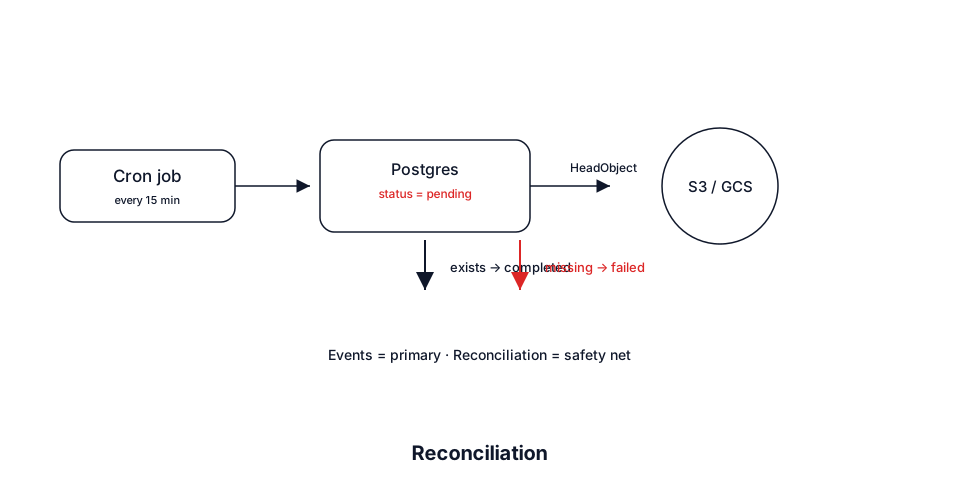
Events can fail too — add reconciliation as a safety net. A periodic job checks files stuck in pending and verifies against storage. Events as primary mechanism, reconciliation for stragglers.
Cloud provider terminology
Each provider names the same concepts differently. You don't need SDK function names in interviews — understand the ideas. This table answers "what's the equivalent in X?"
| Feature | AWS | Google Cloud | Azure |
|---|---|---|---|
| Temporary upload URLs | Presigned URLs (PUT/POST) | Signed URLs (resumable/simple) | SAS tokens |
| Multipart uploads | Multipart Upload (5MB–5GB parts) | Resumable Uploads | Block Blobs (4MB–100MB) |
| Event notifications | S3 Events → Lambda/SQS/SNS | Cloud Storage Pub/Sub | Event Grid |
| CDN signed URLs | CloudFront signed URLs/cookies | Cloud CDN signed URLs | Azure CDN + SAS |
| Cleanup policies | Lifecycle Rules | Lifecycle Management | Lifecycle Management Policies |
When to use in interviews
Rule is simple: files larger than ~10MB through your API → this pattern immediately. Exact threshold depends on infrastructure; 10MB is where pain becomes real.
Common scenarios
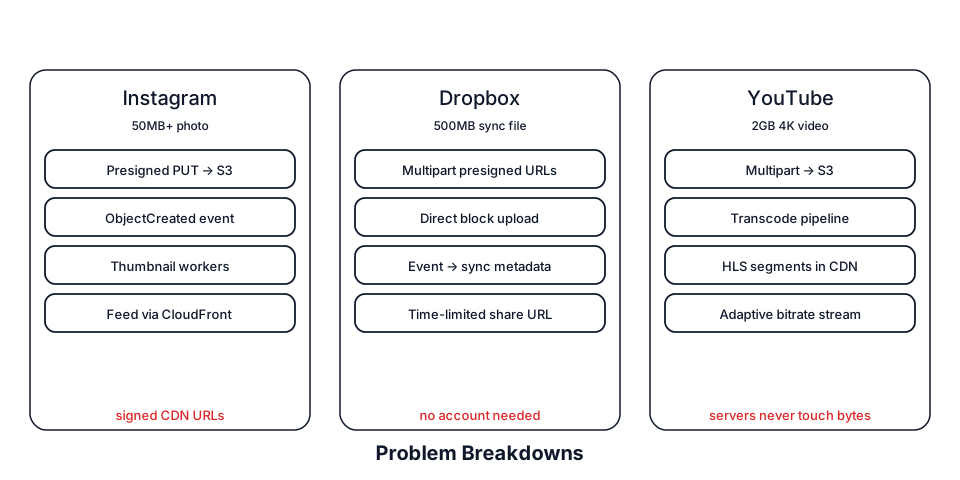
- YouTube / video — presigned S3 upload + multipart; S3 events trigger transcode; CloudFront serves segments with signed URLs.
- Instagram / photos — mobile gets presigned URLs for 50MB+ originals; events trigger thumbnail/filter workers.
- Dropbox / file sync — chunked presigned uploads; time-limited signed share links without recipient accounts.
- WhatsApp / chat media — upload direct to storage; chat passes file reference; signed download URLs expire.
When NOT to use
- Small files (<10MB) — normal API endpoints; presign adds latency for no benefit.
- Synchronous validation — CSV import needing header validation before accept → must proxy bytes.
- Compliance inspection — data must pass certified scanners (PCI, HIPAA) before storage.
- Instant content feedback — face detection on profile photo during upload breaks async UX.
Common deep dives
What if upload fails at 99%?
Use chunked uploads for files over 10MB. Client queries which parts succeeded (ListParts / session status / committed blocks). Resume from the first failed part. Store session ID in localStorage for app-restart resume. Set lifecycle policies — incomplete parts cost money.
How do you prevent abuse?
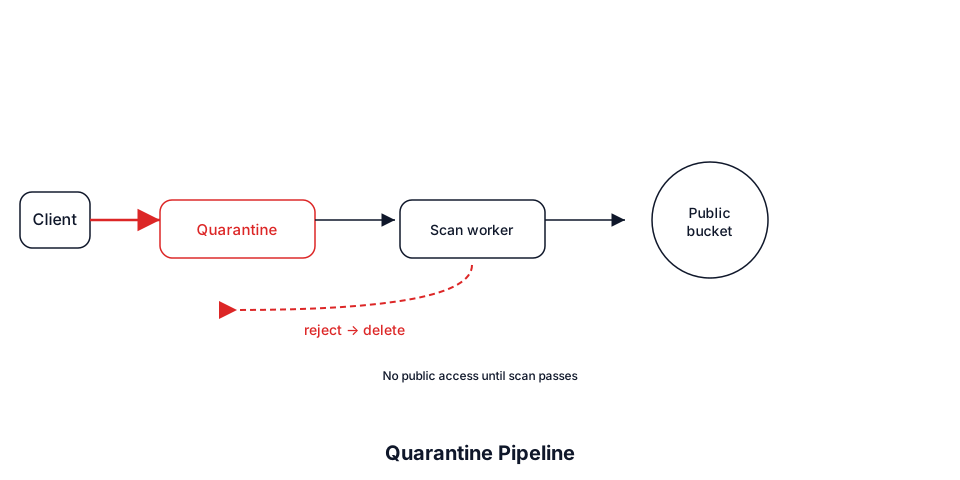
Don't let users immediately access uploads. Quarantine bucket first — virus scan, content validation, type checks — then move to public bucket and set status "available." Include file size limits in presigned URL conditions. Processing delay naturally throttles automation.
How do you handle metadata?
Rich metadata lives in your database, not object tags. Create DB record with status pending when generating presigned URL — includes storage_key. Use consistent key pattern like uploads/{user_id}/{timestamp}/{uuid}. Never let clients specify their own keys. Events include the key to find the exact row.
How do you ensure downloads are fast?
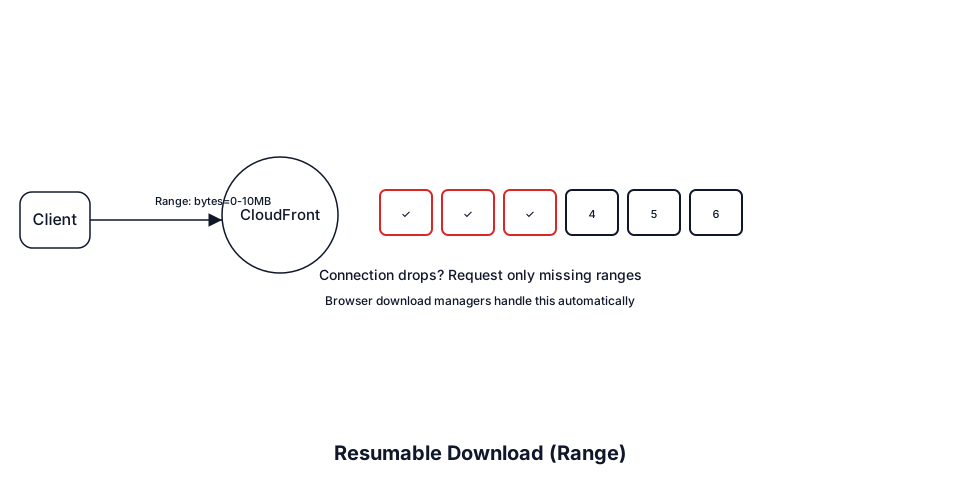
Serve through CDN with signed URLs. First user pulls from origin; subsequent users in-region get cached copies at single-digit ms latency. For large files, enable HTTP range requests for resumable downloads. Pragmatic approach: CDN + range support; let browser/download manager optimize. Parallel chunk downloads are rarely worth the complexity.
Cost and performance levers
Interview Q&A by level
Practice saying these out loud for large blob storage. Interviewers grade clarity and judgment more than buzzwords.
Match depth to the bar: define → trade off → operate. Don't dump principal answers in an entry-level screen.
Conclusion
Large blob handling appears in almost every user-generated content interview. When you hear "video uploads," "file sharing," or "photo storage," think bypassing servers for data transfer. Shift from moving bytes through infrastructure to orchestrating permissions and managing distributed state.
Demonstrate you understand both performance benefits and complexity trade-offs. Know when to use direct uploads (over 10MB) and when not to (small files, compliance). State synchronization is where many candidates stumble — events plus reconciliation is the answer.
Control plane mints presigned URLs; data plane ships gigabytes straight to blob storage — never through your app servers.
Related: Common patterns · Design Dropbox · Managing long-running tasks · Scaling reads (CDN).