Why context management is the real product
Agents don't usually fail because the model is "dumb." They fail because turn 40 still contains an 80KB tool dump from turn 3, the goal got buried, and you paid for tokens that hurt attention. Context engineering is the craft of managing what enters the prompt — as important as tool design and as interviewable as caching.
Trim · summarize · offload.
State · checkpoint · store.
Nodes · middleware · HITL.
UI history ≠ LLM RAM.
Pair with Agentic architectures (memory layers), Deep Agents Q&A (filesystem harness), RAG (retrieve-on-demand), and Prompt engineering (what stays in the system prompt).
What "context" means here
In agent systems, context is everything the model sees and can use: system instructions, conversation turns, tool results, retrieved docs, user prefs, scratchpads, and images. It is not only "chat history."
- Must fit — model max input tokens (hard ceiling).
- Must matter — extra tokens can dilute attention ("lost in the middle").
- Must be cheap enough — every agent step re-sends most of the working set.
- Must be durable when needed — HITL and multi-day threads need resume without replaying the world.
Say "context engineering" out loud — then name window limits, cost, and attention before naming LangGraph.
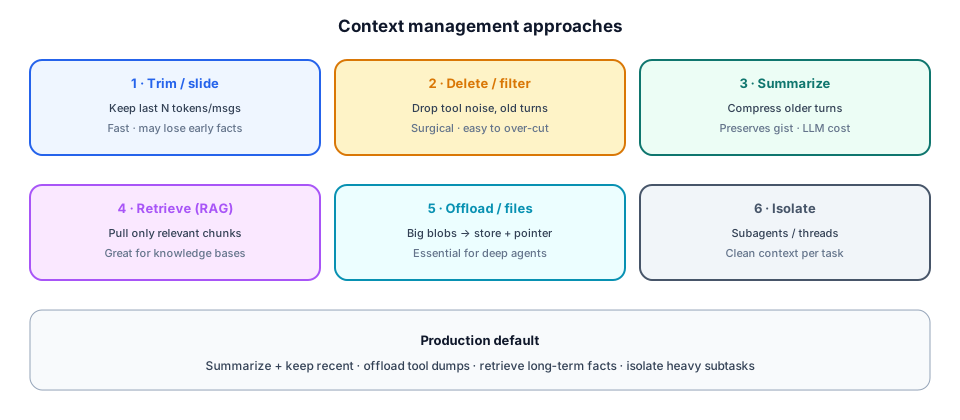
Six approaches (combine them)
1 · Trim / sliding window
Keep the last N messages or ~T tokens. Fast and predictable. Risk: early constraints ("never refund over $50") disappear. Use when chats are short or when a summary already captured the past.
2 · Delete / filter
Drop noisy tool payloads, debug traces, or middle turns that no longer matter. Surgical. Risk: over-deleting facts the user still expects the bot to remember.
3 · Summarize
Compress older turns into a rolling summary; keep recent messages verbatim. Preserves gist better than trim-alone. Costs an extra LLM call when the threshold fires.
4 · Retrieve (RAG / selective memory)
Don't keep the whole knowledge base in state — pull chunks or facts when needed. Best for policies, docs, and long-term user preferences stored outside the thread.
5 · Offload / filesystem
Large tool results and artifacts go to object storage or a virtual filesystem; the prompt keeps a pointer + short summary. This is why Deep Agents ships filesystem backends.
6 · Isolate (subagents / threads)
Give a research subagent its own context so the parent stays clean. Merge only the conclusion. Multi-agent for context hygiene, not for resume keywords.
How LangGraph models context (three layers)
LangGraph's docs split context by mutability and lifetime. Memorize this table — it's the cleanest interview answer for "how does LangGraph handle memory?"
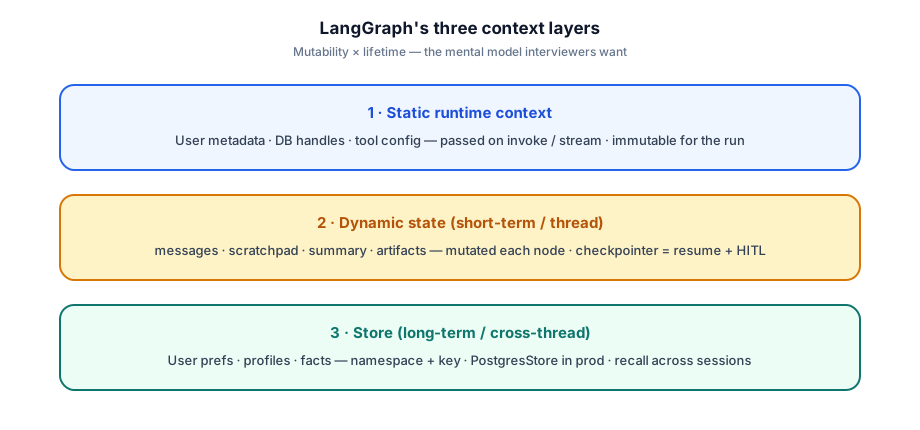
- Static runtime context — user id, tenant, DB connections, feature flags. Passed into
invoke/stream. Immutable for that run. Not chat history. - Dynamic state (short-term) —
messages, summary, scratchpad, pending tool calls. Lives in the graph state. With a checkpointer, it persists across turns under athread_id(resume, HITL, time-travel). - Store (long-term) — user preferences, profiles, durable facts under
namespace+key. Cross-thread. Recall into state when needed — don't paste the whole profile every turn.
Short-term = state + checkpointer. Long-term = store. Static = invoke context. Don't mash them into one Redis key.
Why LangGraph makes this easy
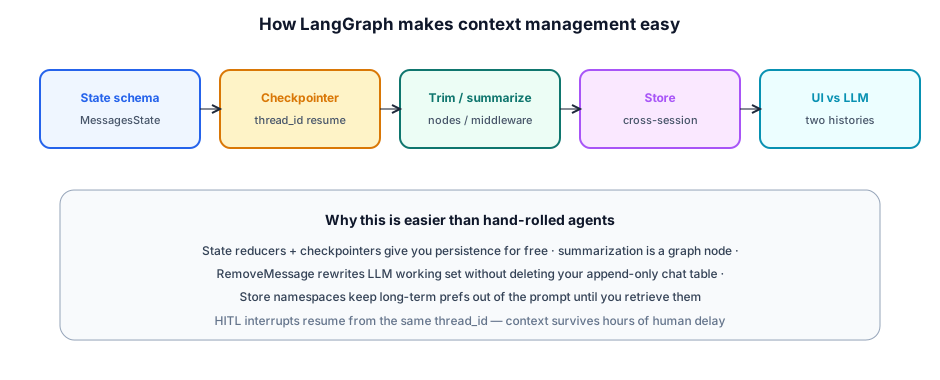
Hand-rolled Flask+Redis agents usually invent half of this poorly. LangGraph's value for context isn't "magic compression" — it's first-class state, persistence, and a place to hang your compaction policy as a node.
Pattern: trim and summarize in the graph
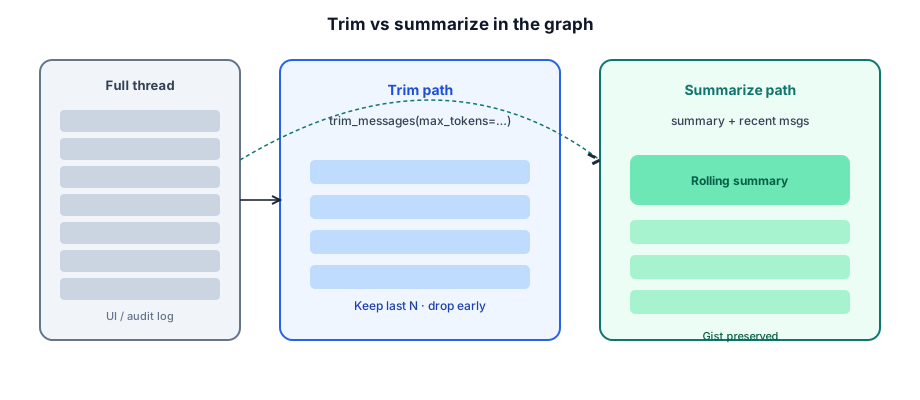
# Conceptual sketch — trim before the model call
from langchain_core.messages import trim_messages

def call_model(state, config):
    # Keep ~4k tokens of recent dialogue for the LLM
    window = trim_messages(
        state["messages"],
        strategy="last",
        token_counter=count_tokens,
        max_tokens=4000,
        start_on="human",
        include_system=True,
    )
    return {"messages": [llm.invoke(window)]}

# Summarize path: a node writes state["summary"], then call_model
# builds prompt = [System(summary)] + recent_messages
# Optional: RemoveMessage to shrink checkpointer working set after summarize.- Trigger — message count, token estimate, or fraction of model max input.
- Keep — last N messages verbatim so the bot doesn't "forget" the last ask.
- Rolling summary — feed prior summary + new turns into the summarizer so it stays incremental.
- Cheaper model — summarize with a small model; reserve the frontier model for the user-facing reply.
The #1 footgun: UI history vs LLM RAM
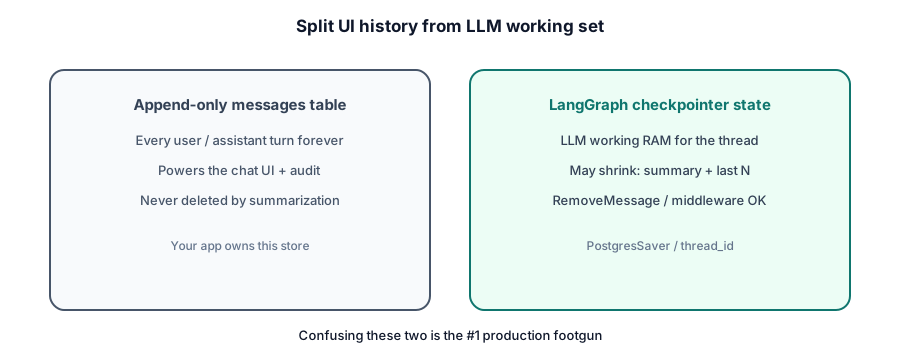
| App messages table | LangGraph checkpointer | |
|---|---|---|
| Purpose | UI + audit | LLM working context |
| Mutability | Append-only | May shrink on summarize |
| Owned by | Your app | Graph runtime |
| Query for chat scroll? | Yes | No |
| Query for next LLM call? | No (or selectively) | Yes |
Say you'll dual-write: append to chat DB for humans; manage checkpointer state for the model. Principals listen for this split.
Long-term memory with the store
Thread state shouldn't accumulate "user prefers dark mode" forever. Put durable facts in the LangGraph store under namespaces like ("users", user_id), then a node loads only what's needed into state or the system prompt.
# Conceptual — long-term preference recall
def load_prefs(state, config, *, store):
    user_id = config["configurable"]["user_id"]
    item = store.get(("users", user_id), "preferences")
    prefs = item.value if item else {}
    return {"prefs": prefs}  # later folded into the system message

def save_pref(state, config, *, store):
    user_id = config["configurable"]["user_id"]
    store.put(("users", user_id), "preferences", state["prefs"])
return {}- When to use store — prefs, profiles, learned procedures, cross-session facts.
- When to keep in state — this conversation's tool traces, current plan, HITL pending action.
- Production —
PostgresStore(or equivalent) besidePostgresSaver.
Worked example: support agent thread
Product: multi-day support chat that can look up orders and propose refunds (HITL). Context policy:
- Static context:
tenant_id, tool clients, model name. - State:
messages,summary,pending_refund. - Checkpointer: Postgres,
thread_id = conversation_id. - After each tool call: if payload > 2KB, store in S3, replace message content with pointer + 3-line summary.
- Before
call_model: if tokens > 6k, run summarize node → updatesummary, trim working messages. - Store: user language + VIP flag under
("users", user_id). - UI: always reads append-only
chat_messagestable dual-written on each turn. - Refund tool:
interrupt→ human approves hours later → same thread resumes.
Cost and performance levers
Rapid-fire interview Q&A
Context policy is an architecture decision. LangGraph gives you the hooks; you still choose trim vs summarize vs offload.
Interview Q&A by level
Practice saying these out loud for context management. Interviewers grade clarity and judgment more than buzzwords.
Match depth to the bar: define → trade off → operate. Don't dump principal answers in an entry-level screen.
Wrapping up
Context management is how agents stay coherent, cheap, and safe as threads grow. The approaches are stable — trim, summarize, retrieve, offload, isolate. LangGraph makes them easy by giving you state, checkpointers, stores, and a graph place to run compaction — plus HITL resume that doesn't drop the binder.